Systeme.io vs WooCommerce: Which Is Simpler for Selling One Digital Product?
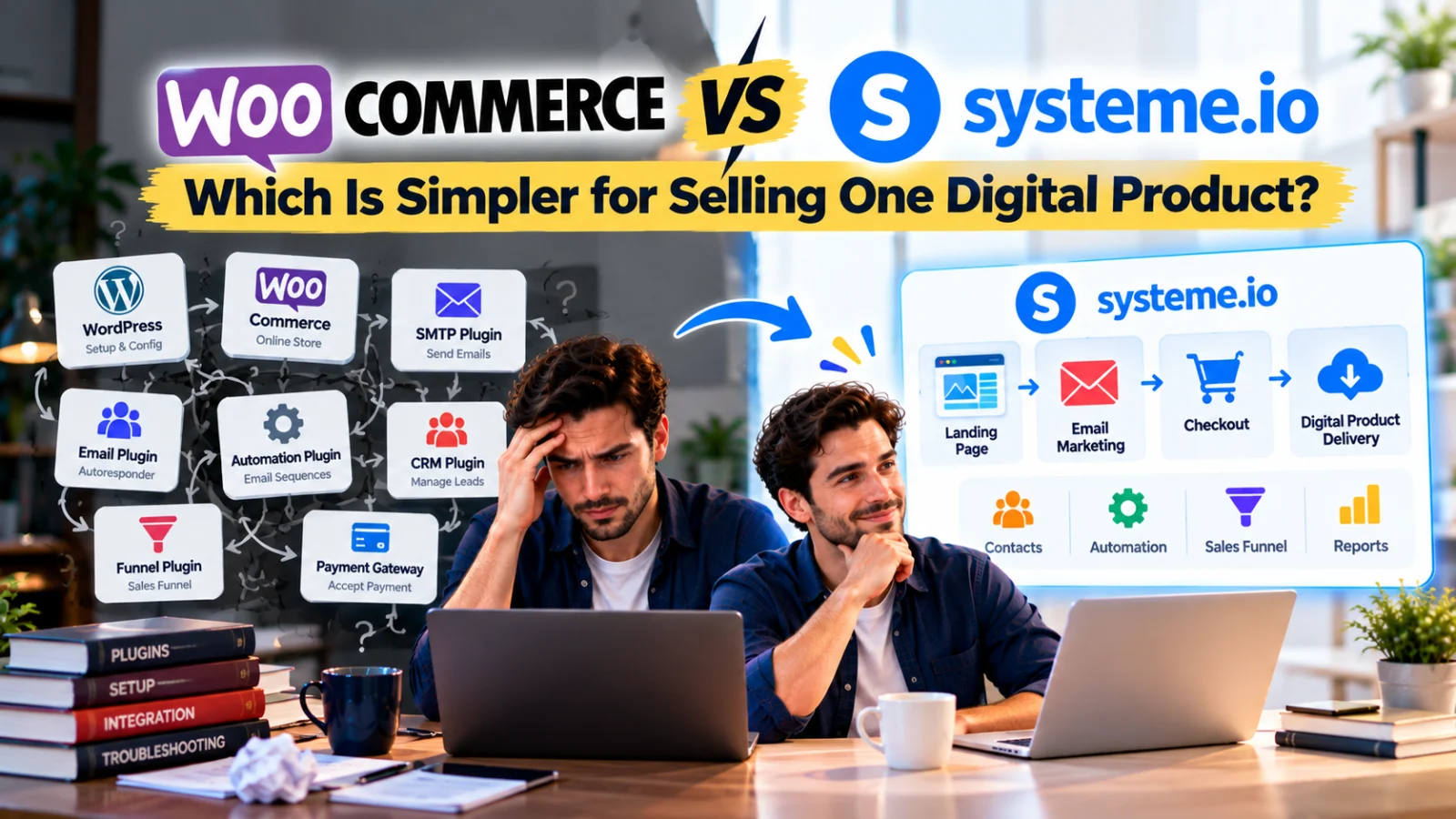
WooCommerce is free. That makes it an obvious option when you want to sell a digital product from WordPress.
And for a basic downloadable product, WooCommerce core is genuinely capable. You can mark a product as virtual and downloadable, attach files, set download limits or expiry, take payment and give the customer a download link after purchase.
So the problem is not that WooCommerce cannot sell an ebook, template or spreadsheet without premium software.
The problem often appears around the sale.
You start with one free ecommerce plugin. Then you think about reliable email delivery. Then email marketing. Then automated follow-up. Then a landing page. Then lead capture. Then a CRM or sales pipeline. Then an affiliate program. Then perhaps subscriptions, bookings or more advanced automation.
Before long, your “free store” has become a software-integration project.
For someone who enjoys WordPress, that flexibility can be a major advantage. For a beginner whose real goal is simply to launch one digital product, it can also delay the moment that matters: the first sale.
Systeme.io vs WooCommerce for Selling One Digital Product
The biggest difference is not whether either platform can accept an order.
It is how much infrastructure you need to assemble around that order.
A simple digital-product business may eventually need:
Landing Page → Lead Capture → Email → Sales Page → Checkout → Delivery → Follow-Up
With WooCommerce, the store and downloadable-product functionality can come from WooCommerce core, while other parts of that journey may come from WordPress, your theme or page builder, an SMTP solution, an email-marketing service, automation plugins and other extensions.
With Systeme.io, funnels, email marketing, contacts, limited automation, selling, courses, affiliate management and CRM pipelines are already part of the same platform, including limited access on its current Free plan.
Systeme.io vs WooCommerce: The Hidden Comparison Is Setup Time
Software cost matters, but setup time is also a cost.
Imagine two beginners each have the same finished $29 spreadsheet product.
The first spends days researching:
- which WordPress host to use;
- which theme or page builder to use;
- how WooCommerce downloadable products work;
- how transactional email is delivered;
- which SMTP provider or plugin to configure;
- which email-marketing platform to connect;
- how to automate a welcome or buyer sequence;
- how to track leads;
- which plugins overlap;
- whether plugin updates remain compatible.
The second builds one sales funnel, connects payment, configures delivery and launches.
The first setup may eventually become more flexible. But if all that flexibility is unnecessary for the first product, it can become a form of procrastination disguised as infrastructure.
First, Give WooCommerce Credit: Digital Downloads Are Built In
WooCommerce core supports virtual and downloadable products.
Its official documentation shows that you can attach downloadable files, choose a download limit and set a download expiry. Customers can receive download links through the order email, the order-received page and the My Account area depending on your settings.
For products marked both virtual and downloadable, WooCommerce can move the order directly to Completed after payment, allowing access according to the store’s download settings.
That is a strong free core feature.
You do not need to buy a premium WooCommerce extension merely to sell a straightforward PDF or ZIP download.
Where the Extra Setup Begins: Reliable Store Email
Your customer needs order confirmations and download information to arrive reliably.
WooCommerce’s own documentation explains that neither WordPress nor WooCommerce directly sends email. WooCommerce generates the message and triggers WordPress’s wp_mail(); WordPress then relies on the server’s mail environment unless you configure another delivery route.
WooCommerce recommends understanding dedicated SMTP providers because authenticated email infrastructure can improve reliability.
That means a production store may add another setup layer:
WooCommerce → WordPress Mail → SMTP Plugin / Integration → Email Provider → Customer
There are free SMTP plugins and providers, so this is not automatically a premium cost.
But it is still something you may need to choose, configure, authenticate and test.
Transactional Email Is Not the Same as Email Marketing
WooCommerce can send order-related emails. That is different from building a marketing sequence such as:
Lead → Welcome Email → Helpful Tip → Product Offer → Customer Follow-Up
For that, a typical WordPress/WooCommerce setup may connect to a dedicated email-marketing platform or add an automation solution.
This is where the stack can expand.
Systeme.io currently includes email marketing in the same account. Its Free plan allows up to 2,000 contacts and unlimited email sends, alongside limited automation.
For a first product, you can keep:
Opt-In → Contact → Campaign → Sales Funnel
inside the same system rather than synchronizing a WordPress form with a separate autoresponder.
Automation Can Become Another WooCommerce Layer
Suppose you want something beyond the default order emails.
You might want to:
- send a sequence after purchase;
- tag buyers differently from leads;
- follow up with customers later;
- trigger messages based on store activity;
- create more sophisticated customer journeys.
There are many ways to do this in the WordPress ecosystem, including free and paid tools.
But WooCommerce’s own marketplace demonstrates how advanced functionality can become separate paid extensions. For example, its current extensions catalog lists AutomateWoo at $159 annually.
That does not mean you must buy AutomateWoo. It means advanced automation is not simply the same thing as installing free WooCommerce core.
Some WooCommerce Business Models Do Require Paid Extensions
Again, selling one basic download does not require them.
But your requirements may grow.
WooCommerce’s current official marketplace lists examples such as:
| Woo Extension | Current Listed Price | Example Need |
|---|---|---|
| AutomateWoo | $159/year | Advanced store automation |
| WooCommerce Subscriptions | $279/year | Recurring subscription products |
| WooCommerce Bookings | $249/year | Bookable appointments/services |
| Product Bundles | $79/year | Advanced product bundles |
Prices and extensions can change, so these should always be checked before purchase.
The point is not “WooCommerce is expensive.”
The point is that WooCommerce is modular. You choose and pay for the additional capabilities you need.
Modular Can Be Excellent—or Exhausting
WordPress users often love this modularity because it gives them control.
You can choose your host, theme, checkout design, SMTP service, email provider, analytics, CRM and automation stack.
That is powerful when you know what you want.
It can be exhausting when you do not.
A beginner may spend more time comparing plugins than validating the product.
Research → Install → Configure → Connect → Test → Conflict → Troubleshoot → Repeat
Every component may be individually good. The complexity comes from making the components behave like one system.
Systeme.io Takes the Opposite Approach
Systeme.io tries to reduce the number of decisions.
Its current Free plan includes:
- 2,000 contacts;
- 3 sales funnels;
- unlimited email sends;
- 1 automation rule;
- 1 workflow;
- 1 course;
- 1 CRM pipeline;
- 1 affiliate program;
- 1 custom domain;
- unlimited file storage.
The Free plan currently costs $0, requires no credit card and does not expire.
That does not give you unlimited capacity. It gives you enough integrated capacity to test a relatively simple business.
The CRM Pipeline Difference
Imagine your digital product also generates higher-value enquiries.
You may want:
Lead → Contacted → Qualified → Proposal → Won / Lost
WooCommerce is fundamentally an ecommerce system, not a built-in sales CRM pipeline.
WordPress can absolutely gain CRM functionality through plugins or external CRM platforms, but that means choosing and integrating another component.
Systeme.io currently includes CRM Pipelines as part of the platform, with one pipeline available on Free.
For a creator who never needs lead tracking, this may not matter.
For a consultant who sells a $29 template and also receives $1,000 service enquiries, it can matter a lot.
The Affiliate Program Difference
Suppose your product starts selling and you want other people to promote it.
WooCommerce has an extensive extension ecosystem for affiliate functionality, including free and paid third-party options. But affiliate management is not part of the basic WooCommerce core installation.
Systeme.io currently includes one affiliate program on Free.
That lets you experiment with:
Affiliate Link → Funnel → Sale → Commission Tracking
without first choosing another affiliate plugin.
You still need to configure commissions, attribution and payouts properly.
The Funnel Difference
WooCommerce gives you store and product structures. WordPress gives you pages. Your theme or page builder controls much of the presentation.
You can absolutely create excellent sales pages with WordPress.
But a beginner may need to decide how to turn those pieces into a focused funnel.
Systeme.io starts from the funnel concept:
Landing Page → Order Form → Thank You → Follow-Up
The current Free plan includes three funnels, which is enough for a lead magnet, main offer and one additional experiment.
What About Selling the Actual Download?
This is one area where WooCommerce core is particularly straightforward.
WooCommerce has a native downloadable-product model designed around files. You can upload the file, set download limits and expiry, and provide customer download access after purchase.
Systeme.io’s selling workflow is broader and integrates funnels, email, courses and automation, but its documented order-form digital resources are structured differently.
For a standalone PDF, ZIP or spreadsheet, plan the Systeme.io delivery workflow carefully—for example through an appropriate delivery page or email/file-link process.
So if your only requirement is:
Product Page → Pay → Download File
WooCommerce core is already a capable solution.
But Most Sellers Eventually Want More Than “Pay and Download”
Consider what happens next.
You may want to capture leads before the sale, send a welcome sequence, segment buyers, sell a course, offer an upsell, launch an affiliate program or track service enquiries.
Then your system becomes:
Content → Lead → Email → Product → Checkout → Delivery → Follow-Up → Next Offer
This is the point where an integrated platform can reduce setup work.
A Realistic WooCommerce Setup for One Digital Product
You might use:
- WordPress hosting;
- WordPress;
- a theme or page builder;
- WooCommerce;
- a payment gateway;
- an SMTP plugin/provider;
- an email marketing or autoresponder system;
- an automation solution if required;
- a CRM plugin/service if you need a sales pipeline;
- an affiliate plugin/service if you launch affiliates.
Not every business needs all ten.
Some components can be free.
Some may already be included with your hosting or existing stack.
But you are responsible for deciding how they fit together.
A Realistic Systeme.io Setup
For a simple first offer:
Systeme.io Account → Funnel → Checkout → Delivery → Email
If needed, the same account can also provide:
Automation → CRM Pipeline → Course → Affiliate Program
You still need to connect a payment processor and configure your business correctly. “All-in-one” does not mean zero setup.
It means fewer separate systems to select and connect.
The Cost Nobody Puts on the Pricing Page: Your Time
Suppose you value your working time at only $20 per hour.
If you spend ten extra hours researching plugins, configuring SMTP, connecting an autoresponder, testing integrations and troubleshooting conflicts, that is $200 of your time before considering any paid extension.
The exact number will be different for everyone. An experienced WordPress developer may assemble the stack quickly. A beginner may spend far longer.
This is why “WooCommerce is free” and “Systeme.io is free” do not tell you the whole story.
The real question is:
How quickly can this stack get my offer in front of a paying customer?
Setup Delay Can Delay Revenue
There is no guarantee that launching earlier creates profit. A bad product launched quickly is still a bad product.
But you cannot learn from real buyers while the store is permanently “almost ready.”
Every unnecessary week spent perfecting infrastructure postpones useful feedback:
- Will people click?
- Will they buy?
- Is the price acceptable?
- Does the product solve the problem?
- What objections do customers have?
The faster you reach those questions, the faster you can improve the actual business.
When WooCommerce Is the More Natural Choice
WooCommerce can make excellent sense when:
- you already have a WordPress site;
- you know WordPress well;
- you want deep control over your site;
- you need a conventional product catalog;
- you want native downloadable-file handling;
- you have specific plugins or integrations you already trust;
- you are comfortable maintaining hosting, updates and plugins;
- your business may grow into more complex ecommerce.
In that situation, modularity is a feature rather than a burden.
When Systeme.io Can Save a Beginner Time
Systeme.io is particularly attractive when:
- you are starting from zero;
- you have one digital product;
- you want a funnel rather than a large store;
- you need email marketing immediately;
- you want simple automation;
- you may need a CRM pipeline;
- you want to test an affiliate program;
- you do not want to research a WordPress plugin stack first.
For this person, the advantage is less about one magical feature and more about reducing setup decisions.
What If You Already Have WordPress?
You do not have to choose one platform for everything.
A practical hybrid setup is:
WordPress Blog → Systeme.io Funnel → Checkout → Email Follow-Up
Keep WordPress for content and SEO. Use Systeme.io for focused conversion flows.
This can be simpler than rebuilding a mature WordPress site or forcing every marketing function into WooCommerce.
Do Not Install a Plugin Until You Can Name the Problem
This rule can save WordPress users a lot of time.
Do not install a CRM plugin because “a business needs CRM.”
Install one when you have leads you are losing track of.
Do not buy automation software because sophisticated funnels look impressive.
Add automation when a repetitive manual step is actually costing time.
Do not buy a subscription extension if you sell one lifetime-access PDF.
Infrastructure should follow the business problem.
A Faster Launch Plan for One Digital Product
Whether you choose WooCommerce or Systeme.io, the first version should be small.
- Create the product.
- Write one focused sales page.
- Set the price.
- Connect payment.
- Configure delivery.
- Send the essential customer email.
- Complete a real test purchase.
- Launch.
Then add lead magnets, advanced automation, CRM stages, affiliates, order bumps or additional products when there is evidence that you need them.
Systeme.io vs WooCommerce: A Practical One-Product Comparison
| Need | WooCommerce / WordPress | Systeme.io Free |
|---|---|---|
| Sell a basic downloadable file | Built into WooCommerce core | Possible, but delivery workflow should be configured appropriately |
| Sales funnel builder | Build with WordPress/theme/builder or add funnel tooling | 3 funnels included |
| Email marketing | Usually connect/add an email-marketing solution | Included; unlimited sends up to plan contact limit |
| Reliable SMTP-style delivery setup | Often configure dedicated SMTP/provider for WordPress mail reliability | Email infrastructure is part of hosted platform |
| Basic automation | Add/configure appropriate plugin or external service | Limited automation included |
| CRM sales pipeline | Add CRM plugin/service if needed | 1 pipeline included |
| Own affiliate program | Add affiliate solution | 1 program included |
| Course hosting | Add LMS/membership solution if needed | 1 course included |
| Control and extensibility | Very high | More opinionated hosted system |
| Maintenance | You manage WordPress/plugin stack | Hosted platform manages core application |
Final Takeaway
WooCommerce and Systeme.io can both be sensible ways to sell one digital product, but they optimize for different things.
WooCommerce gives you a strong free ecommerce core and excellent native downloadable-file handling. Its modular WordPress ecosystem gives you enormous control over what you add next.
That same modularity can create setup work. Reliable email delivery, autoresponder sequences, automation, CRM pipelines, affiliate management and other marketing functions may require additional plugins, services, accounts and configuration. Some options are free; some official advanced WooCommerce extensions are paid.
Systeme.io’s current Free plan takes a more integrated approach: up to 2,000 contacts, three funnels, unlimited email sends, limited automation, one CRM pipeline, one course and one affiliate program in the same platform.
For an experienced WordPress user who wants control, WooCommerce may be entirely comfortable.
For a beginner with one product and no existing stack, the bigger risk may be spending so much time building the “perfect” system that the product never reaches customers.
You do not earn revenue from installing plugins. You earn revenue when a customer buys something valuable.
Choose enough software to make that transaction reliable. Then launch, learn and improve.
Suggested Articles to Read
 Want to Sell an Online Course Without Building a Website?
 Want to Sell an Online Course? Here’s the System You Actually Need
 Systeme.io vs Teachable: Which Is Better for Selling Your First Online Course?
 Systeme.io vs Kajabi: Do Beginners Need to Pay for an All-in-One Platform?
 Systeme.io vs Gumroad: Which Is Better for Selling Your First Digital Product?