How to Sell an Ebook Without a Website Using Systeme.io
You do not need to build a traditional website before selling an ebook. A focused sales funnel can give potential buyers the information they need, collect payment and deliver the file automatically without the cost and maintenance of a full website.
One way to build this setup is with systeme.io. It combines landing pages, sales funnels, checkout forms, email marketing and automation in one platform. For a first-time digital-product seller, that means fewer tools to connect and fewer technical steps to manage.
This guide explains how to create a simple ebook sales system using a sales page, an order form and automatic delivery.
What You Need Before You Start
Prepare the following items before building the funnel:
- Your finished ebook in PDF or another appropriate download format
- A clear ebook title and cover image
- A short description focused on the reader’s problem and desired result
- A selling price
- A systeme.io account
- An account with a supported payment processor
You should also decide how customers will receive the ebook. systeme.io supports delivery by email attachment, a download link inside an email, or a download link on the thank-you page.
How the Ebook Sales Funnel Works
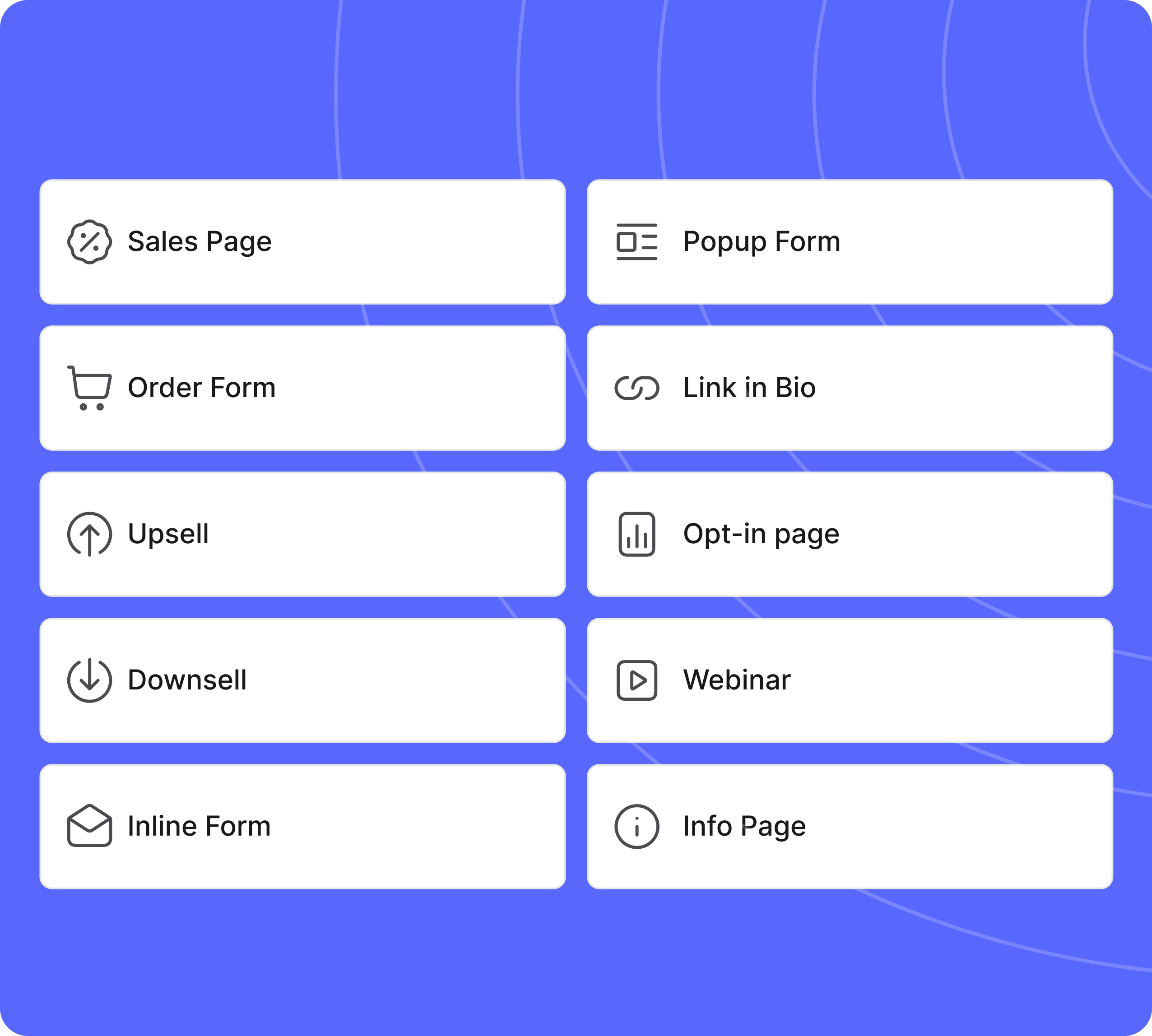
The sales page explains the value of the ebook. The order form collects the customer’s details and payment. After a successful purchase, systeme.io can redirect the buyer to a thank-you page and trigger an automated delivery email.
This is different from building a large multipage website. Every page in the funnel has one clear purpose, making the setup easier to create and the buying process easier to follow.
Step 1: Create a Sales Funnel
After signing in to systeme.io, open Sites and select Sales Funnels. Create a new funnel, enter a descriptive name such as “Ebook Sales Funnel,” choose your currency and select Sell as the funnel goal.
The Sell funnel provides the essential purchase steps, including an order form and a thank-you page. Add a sales page before the order form if one is not already included.
Choose a template that suits the ebook and open it in the page editor. You do not need an elaborate design. A simple page with a strong headline, ebook cover, benefits and a visible purchase button is usually easier for visitors to understand.
Step 2: Build a Clear Ebook Sales Page
Your headline should communicate the main result rather than simply stating the ebook’s name. Explain who the ebook is for, what problem it helps solve and what the reader will be able to do after reading it.
A focused sales page can include:
- A benefit-driven headline
- A short supporting statement
- A clear image of the ebook cover
- Three to five specific reader benefits
- A brief description of what is included
- A visible call-to-action button
- Relevant trust elements, such as an author introduction or refund policy
Avoid filling the page with unrelated links. The main action should be moving from the sales page to the order form.
Step 3: Configure the Order Form
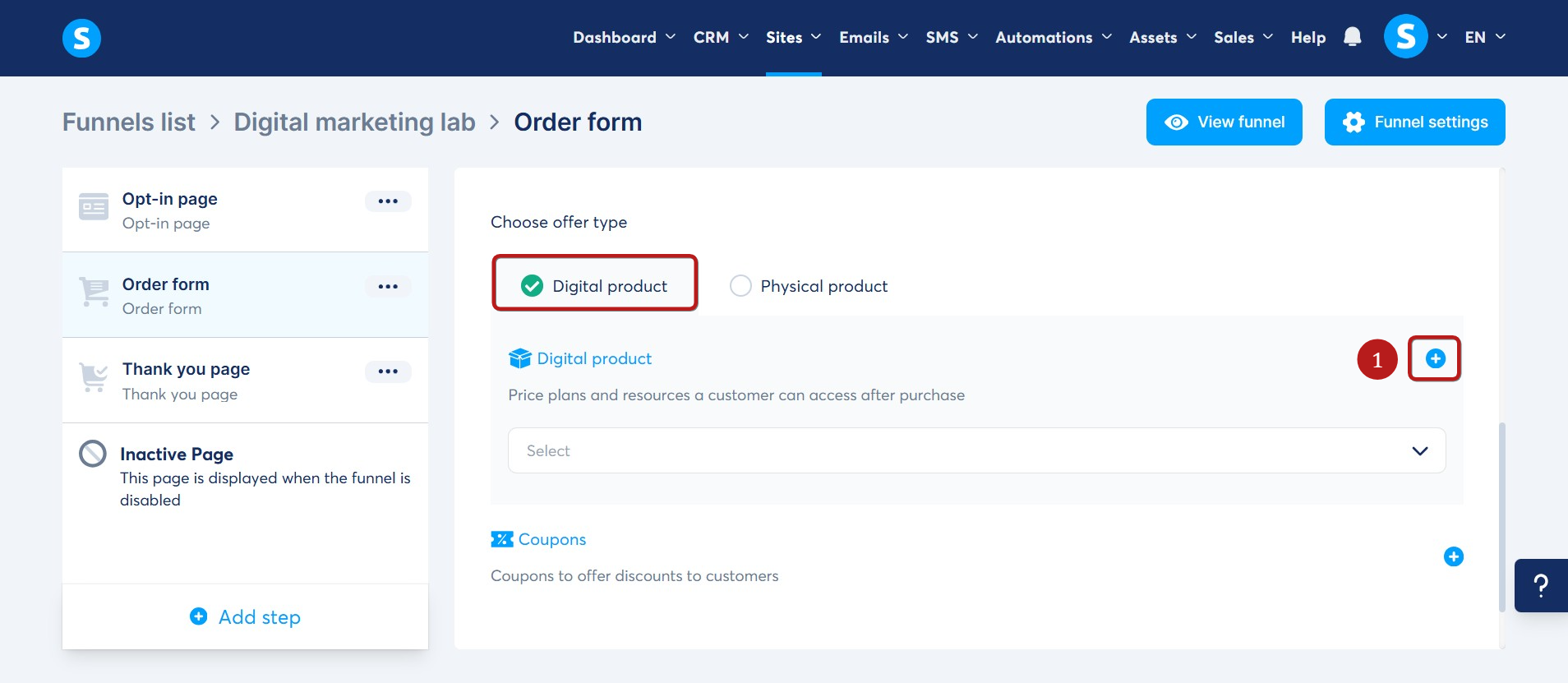
Open the order-form step and select Digital Product as the offer type. Create a product, give it a recognizable name and configure the price plan.
Next, connect a supported payment processor through your systeme.io account settings. Available payment options can vary by country and account configuration. Although systeme.io currently advertises zero platform transaction fees on its plans, the payment processor can still charge its own processing fees.
Review the checkout from a customer’s perspective. The product name, price and payment information should be clear before the buyer submits the order.
Step 4: Deliver the Ebook Automatically
Systeme.io’s official ebook guide describes three delivery methods.
Option 1: Attach the Ebook to an Email
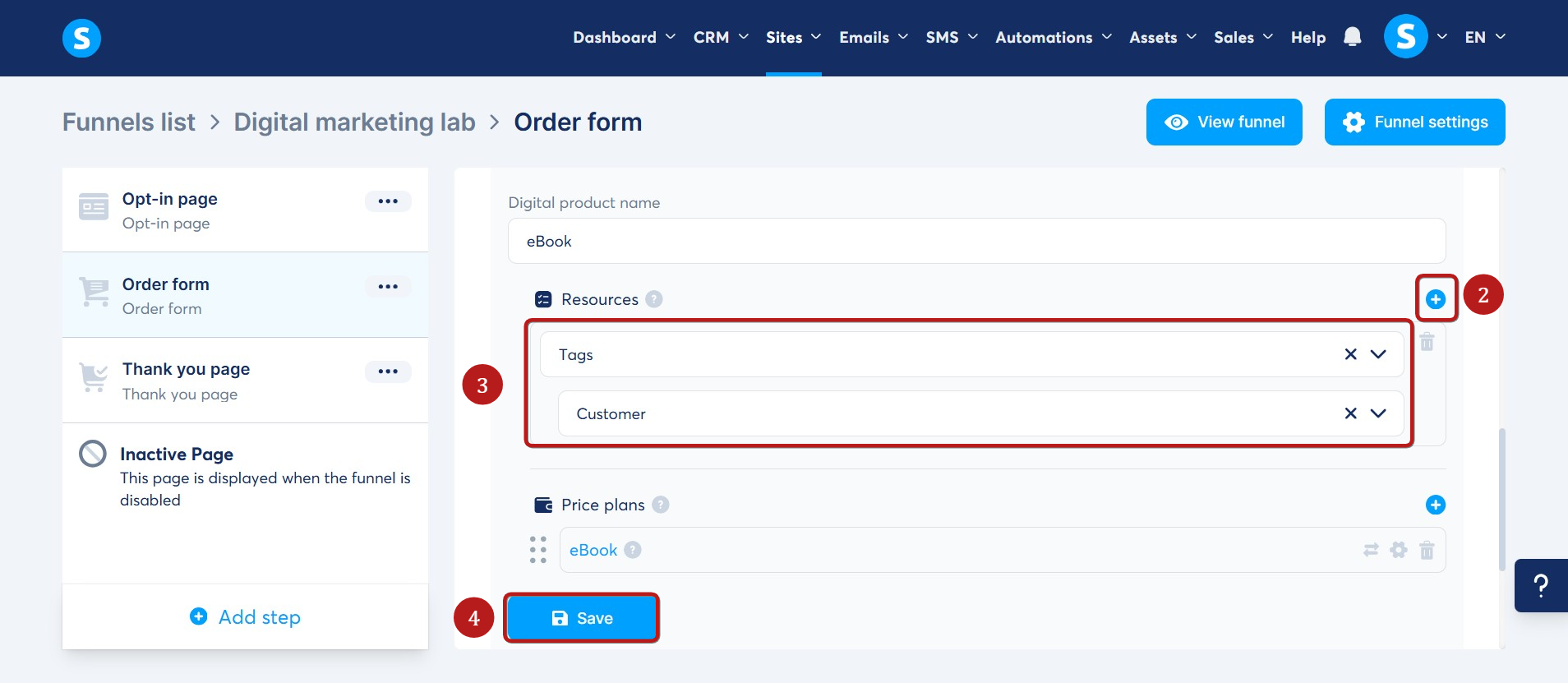
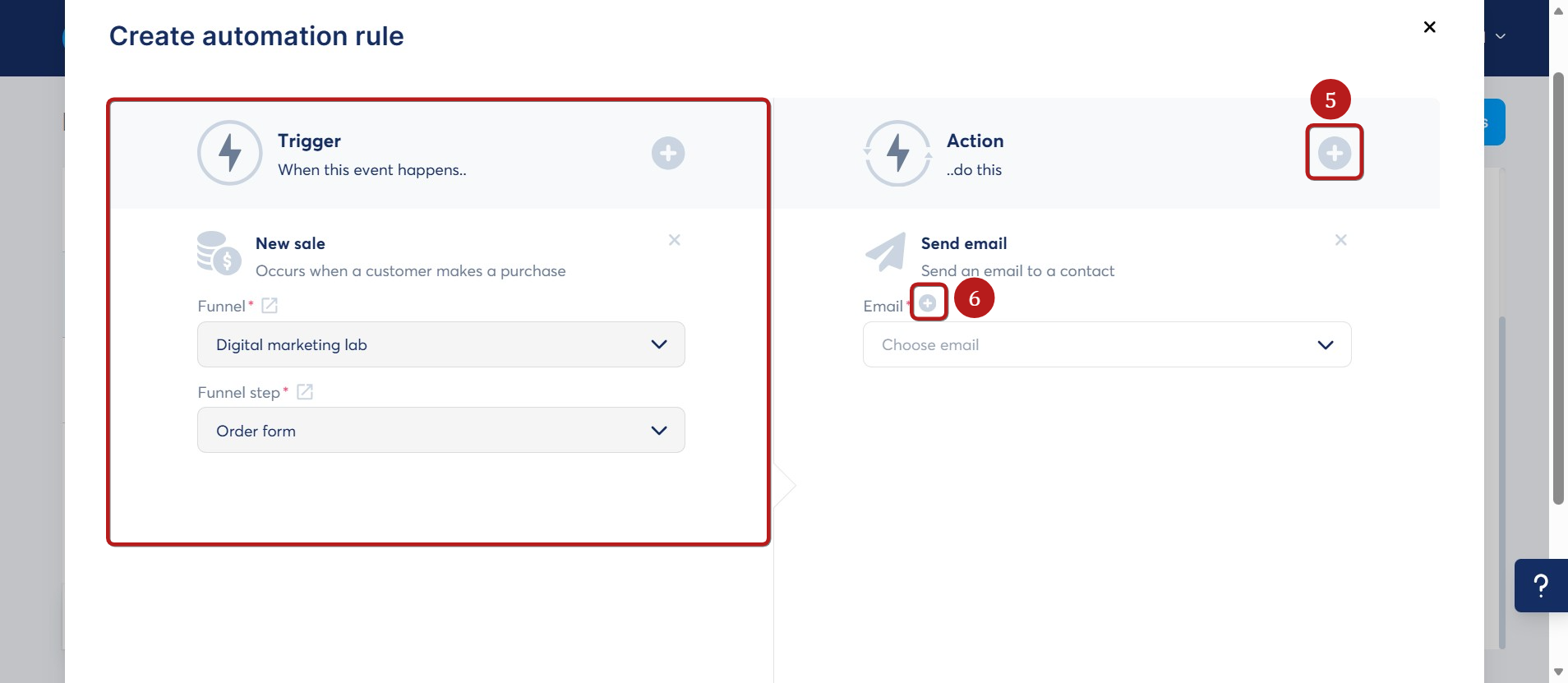
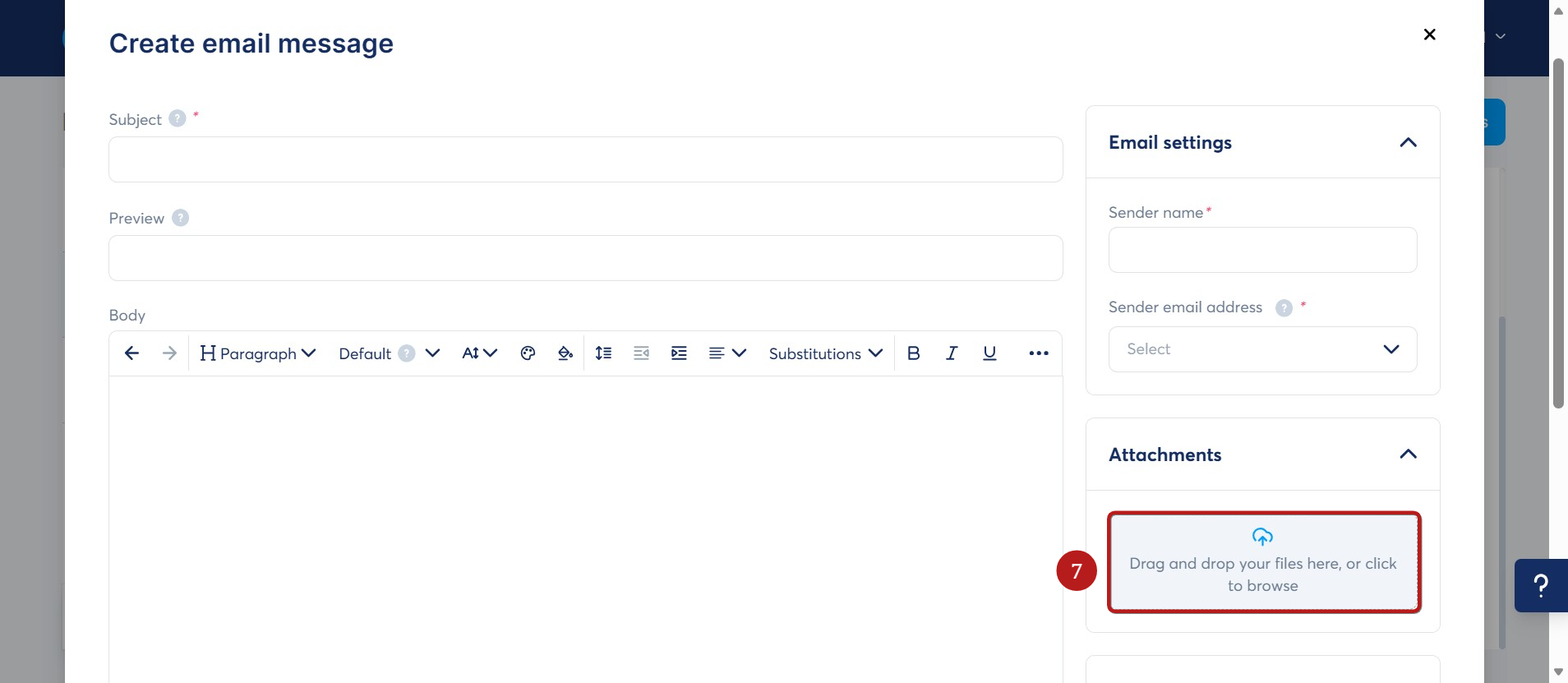
Create a tag for the ebook product. Add an automation rule with New Sale as the trigger and Send Email as the action. Write a simple delivery email and attach the ebook.
Option 2: Send a Cloud Download Link
Upload the ebook to a reputable cloud-storage service and place the download link in the automated email. This keeps the email smaller and works better for files that exceed the attachment limit.
Check the file-sharing permissions carefully. Customers should be able to download the ebook without receiving access to unrelated folders or private account information.
Option 3: Add the File to the Thank-You Page
Add a download button to the thank-you page so buyers can access the ebook immediately after payment. You can also send the same link by email as a backup in case the customer closes the page.
Combining the thank-you page and email methods usually creates the smoothest customer experience.
Step 5: Test the Complete Purchase Process
Do not promote the funnel until you have tested it from beginning to end. Check the sales-page button, order form, payment connection, automation rule, email content and download link.
Open the pages on both desktop and mobile. Confirm that the text is readable, buttons are easy to tap and the checkout does not contain unexpected distractions. Finally, verify that the buyer receives the correct ebook rather than a draft or outdated file.
Final Thoughts
A full website can be useful later, but it is not a requirement for launching an ebook. A focused systeme.io funnel can provide the sales page, checkout and automatic delivery system needed to begin selling online.
Start with the simplest working version. Explain the ebook clearly, make the checkout easy and test the delivery process. You can improve the page after receiving real visitor and customer feedback.
Ready to Build Your Ebook Funnel?
Create your sales page, checkout and delivery workflow in one place.
Affiliate disclosure: This article may contain affiliate links. If you sign up or make a purchase through one of these links, I may earn a commission at no additional cost to you.