What Pages Do You Need to Sell a Digital Product?
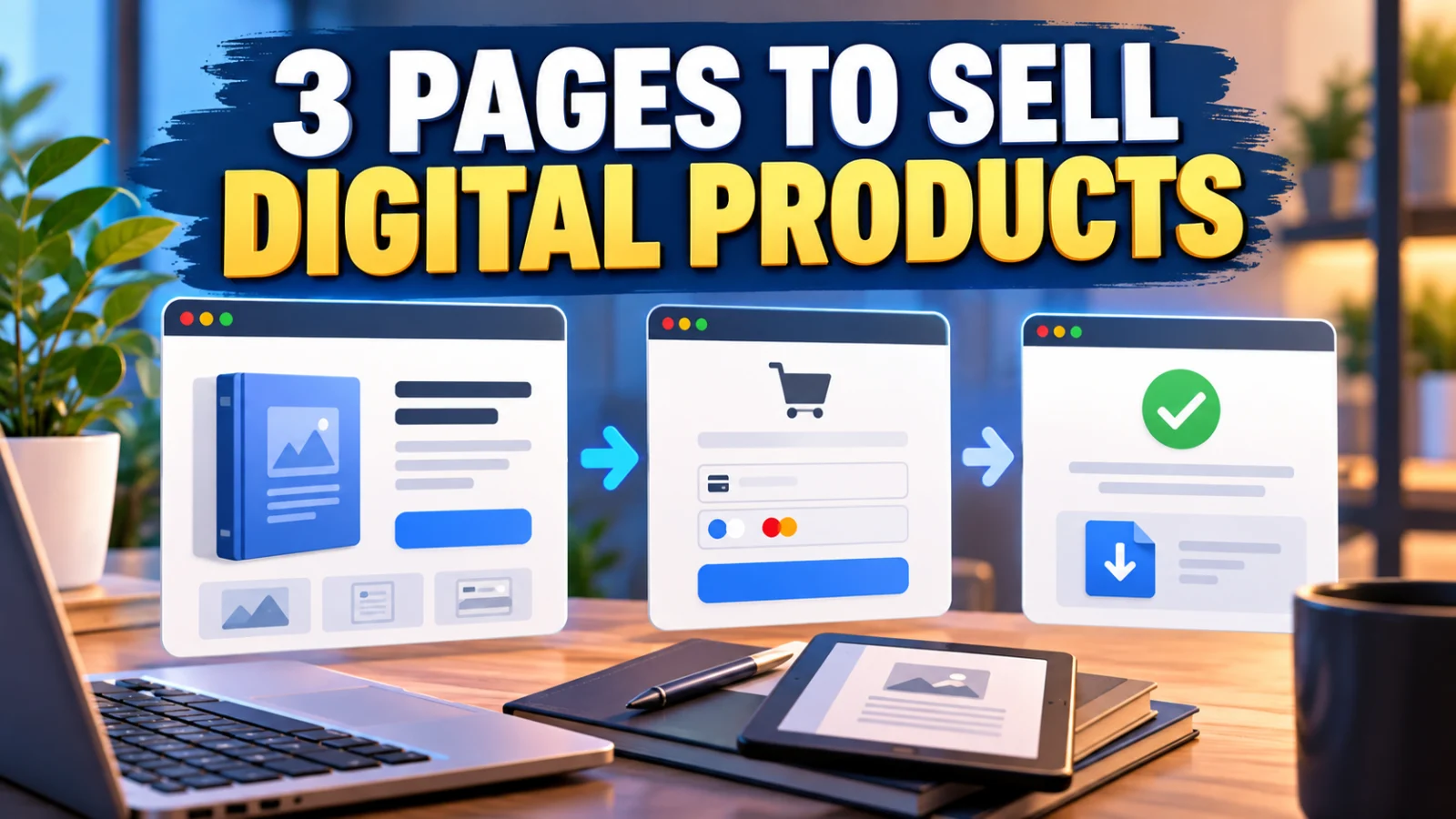
You do not need a large website to sell a digital product. For a simple ebook, template, printable, guide, or other downloadable product, the selling journey can often be built around just a few focused pages.
The simplest digital product setup usually needs three core steps: a sales page that explains the offer, a checkout where the customer pays, and a thank-you or access page that confirms what happens next.
That does not mean every business should use exactly three separate URLs. Some platforms combine the sales page and checkout, while courses or memberships may need additional login and account pages. The important part is not the number of pages. It is making sure every stage of the buying journey has a clear job.
The 3 Core Pages You Need to Sell a Digital Product
Sales Page → Checkout → Thank You / Access
Think of these as three different customer questions:
- Sales page: “Is this product right for me?”
- Checkout: “How do I buy it?”
- Thank-you or access page: “Did my purchase work, and what happens now?”
1. Sales Page: Explain the Product and Why It Matters
The sales page is where a potential customer decides whether your digital product is worth buying. It does not need to be long simply for the sake of looking professional. It needs to answer the questions that matter before someone pays.
A useful digital product sales page should normally explain:
- what the product is;
- who it is designed for;
- the problem it helps solve or result it helps create;
- what the buyer actually receives;
- the price;
- how the product is delivered or accessed;
- important compatibility or usage requirements;
- the next action, usually a clear buy button.
Show the deliverable clearly
Digital products cannot be picked up and inspected like physical products, so clarity matters. If you sell an ebook, tell people the format and what it covers. If you sell templates, explain what software is needed. If you sell a bundle, list the main items included instead of relying on vague wording such as “everything you need.”
Keep the main action obvious
A sales page can contain examples, FAQs, previews, testimonials when genuine, and other supporting information. But the visitor should never have to search for the next step. Make the purchase action easy to identify.
2. Checkout Page: Make Payment Simple
Once someone decides to buy, the job changes. The checkout should help them complete the transaction without unnecessary distractions.
A typical checkout may need the product or order summary, price, customer details required for the transaction, payment fields, and a clear purchase button. The exact fields depend on your payment provider, platform, product, and business requirements.
Do not collect information merely because a checkout template provides a field for it. A simple digital download may not need the same customer information as a physical order that requires shipping.
Can the checkout be part of the sales page?
Yes. A separate checkout URL is not mandatory if your platform securely places the order form directly on the sales page. In that setup, the customer journey may look more like:
Sales Page + Checkout → Thank You / Access
The function still exists even though two stages share one page. This is why it is more useful to plan the customer journey by purpose rather than trying to hit an arbitrary page count.
3. Thank-You or Access Page: Confirm the Purchase
After payment, do not leave the buyer wondering whether the transaction worked. The next page should immediately confirm the successful action and explain what happens next.
Depending on the product, this page can:
- confirm that the order was received;
- provide a download or access button;
- tell the customer to check their email;
- explain how to log in to a course or member area;
- give a short “start here” instruction;
- provide a support path if access fails.
If the product is also delivered by email, the page can tell the buyer what message to look for. If the download is available directly on the page, an email copy or access link can still be useful as a reference when your system supports it.
Do You Need a Separate Product Delivery Page?
Not always.
For a simple PDF, spreadsheet, template, or ZIP download, the thank-you page may also serve as the access page. For a course, membership, software account, or growing product library, a dedicated login or member area may make more sense.
The deciding question is simple: where will the customer reliably return when they want to use what they bought?
If the answer is an email containing a permanent access link, your web setup may remain simple. If customers need ongoing access to lessons, downloads, updates, or account settings, a dedicated customer area becomes more useful.
Other Pages You May Need
The three-page flow covers the core buying journey, but it is not the entire web presence of every business. Additional pages may be appropriate depending on what you sell and how your business operates.
Contact or support page
A visible support route helps customers know what to do when a payment, download, login, or file does not work as expected. This could be a dedicated page, a form, or clearly provided support contact information.
FAQ page
You do not automatically need a separate FAQ page. For a single product, a concise FAQ section on the sales page may be enough. A dedicated help or FAQ area becomes more useful when you sell multiple products or receive recurring questions.
Legal and policy pages
Your required legal, privacy, refund, tax, and business disclosures depend on your jurisdiction, audience, platform, payment provider, and business model. Do not copy another creator’s policies and assume they apply to you. Treat these pages as business requirements to assess separately from the three-page marketing flow.
Login or account page
This is mainly relevant when customers need ongoing authenticated access, such as for courses, memberships, software, or a private resource library.
What About a Homepage?
A homepage can be useful for a broader brand, but it is not automatically required to sell one digital product.
If you are testing a single offer, traffic can go directly to a focused sales page. This is especially practical when visitors come from an email, social profile, advertisement, video description, or another piece of content that already provides context.
As the business grows, a homepage can help people explore multiple products, content categories, support resources, and information about the brand. But building a full multi-page website before validating a simple offer can add work that is not necessary for the first transaction.
A Simple Digital Product Page Map
- Sales page: explain the problem, product, deliverables, price, and buying action.
- Checkout: collect only the information needed to complete the purchase.
- Thank-you/access page: confirm success and show the buyer exactly what to do next.
- Delivery email: send confirmation or access information when appropriate.
- Support route: make help easy to find if something goes wrong.
Then add account, FAQ, legal, support, or broader website pages because your actual business needs them—not because a funnel diagram told you every digital product must have ten pages.
Do You Need an All-in-One Platform?
No specific type of platform is required for this page structure. You can assemble the flow with separate website, checkout, email, and delivery tools, or use a platform that combines several of those functions.
An all-in-one system can be convenient when you want the sales funnel, payment step, email automation, and product delivery to work together. Separate tools may be preferable when you already have a website and only need to add checkout or delivery.
Choose based on the workflow you actually need rather than the number of features a platform advertises.
Final Takeaway
If you are selling your first digital product, start with the customer journey instead of trying to build a large website.
You need somewhere to explain the offer, somewhere to complete the purchase, and somewhere to confirm success and provide the next step. In many setups, that means a sales page, checkout, and thank-you or access page.
Everything else should earn its place. Add pages when they solve a real customer or business requirement, and keep the path from interest to purchase to access as clear as possible.
Suggested Articles to Read
 Want to Sell an Online Course Without Building a Website?
 Want to Sell an Online Course? Here’s the System You Actually Need
 Systeme.io vs WooCommerce: Which Is Simpler for Selling One Digital Product?
 Systeme.io vs Teachable: Which Is Better for Selling Your First Online Course?
 Systeme.io Review: Is It Worth It for Beginners in 2026?