How to Sell a Digital Product and Let Affiliates Promote It Using One Platform

You have a digital product ready to sell. Maybe it is an ebook, a template pack, a course, a toolkit, a printable, or another downloadable resource. You also want other people to promote it for you and earn a commission when they generate a sale.
That sounds simple until you start listing the software you might need: a landing-page builder, checkout system, email platform, product delivery tool, affiliate tracker, automation tool, and perhaps another app just to connect everything. For a first product, that can be far more complicated than necessary.
A simpler approach is to build the complete sales funnel and your affiliate program inside one platform. You can even start from ready-made funnel and page templates instead of designing every page from a blank canvas.
How to Sell a Digital Product and Let Affiliates Promote It Using One Platform
The easiest way to understand the setup is to separate it into two connected journeys. Customer journey: Traffic → Opt-In or Sales Page → Order Form → Optional Upsell / Downsell → Thank You / Product Access. Affiliate journey: Affiliate Signup → Unique Tracking Link → Your Sales Funnel → Customer Purchase → Commission Recorded.
The affiliate does not need a separate version of your store. They send people into the sales funnel you already built, using a link that identifies the referral.
How to Sell a Digital Product and Let Affiliates Promote It Using One Platform Without Building Everything From Scratch
A beginner does not need to design every funnel step manually. A practical platform should let you choose a funnel or page template that is already close to the journey you want, replace the placeholder content with your own copy, images, branding and offer, connect payment, then test the flow. This matters because a full sales funnel is more than one landing page.
A Landing Page Is Only One Part of the Sales Funnel
A landing page normally has one focused objective. A sales funnel is the connected journey around that page. A simple digital-product funnel can be Sales Page → Order Form → Thank You / Delivery. A lead-capture version can be Opt-In → Email Follow-Up → Sales Page → Order Form → Thank You. A more complete funnel can add an Upsell and Downsell before the final Thank You page.
You do not need the longest funnel. You need the sequence that makes sense for your product, price and audience.
Why Funnel Templates Are Useful for a First Product
Starting from a blank page creates two jobs at once: deciding what the funnel should contain and designing it. A suitable template removes some of that blank-canvas work. Instead of deciding the structure of every sales, checkout and thank-you page yourself, you can begin with an existing structure and concentrate on adapting it to your offer.
A template is a starting structure, not a substitute for a good offer. Replace generic copy, images, testimonials and pricing with accurate information about your own product.
Step 1: Define the Digital Product
Before touching the funnel builder, define the product name, problem it solves, intended buyer, what the buyer receives, price, payment model, delivery method, refund policy and support policy. The funnel becomes much easier to build when these decisions are clear.
Step 2: Choose the Funnel Structure
Option A: Direct Sales Funnel
Sales Page → Order Form → Thank You / Delivery. This is a straightforward starting point when the product is easy to understand and visitors can make a purchase decision from the sales page.
Option B: Lead Capture + Sales Funnel
Opt-In → Email Follow-Up → Sales Page → Order Form → Thank You / Delivery. This gives interested visitors a way to join your email list before buying.
Option C: Funnel With Additional Offers
Sales Page → Order Form → Upsell → Downsell → Thank You. An upsell or downsell can be useful when you genuinely have another relevant offer. Do not add one simply because the software allows it.
Step 3: Choose a Funnel Template Instead of Starting Blank
This is where Systeme.io becomes particularly practical for a beginner. Its current funnel builder supports multiple funnel types and page steps, and its official template library provides ready-made pages and full multi-step funnels.
You can choose a template close to your use case, load it into your funnel, and edit the sections in the visual editor. The current official template library covers categories such as ebooks and guides, courses, ecommerce, software and apps, coaching, consulting, marketing and webinars.
The library includes opt-in and squeeze pages, sales and checkout pages, thank-you pages and full multi-step funnels. Systeme.io’s help documentation also lets you choose a template when creating individual sales pages, order forms, opt-in pages, upsells, downsells and thank-you pages.
The beginner workflow is simple: choose the funnel or page type, preview a template, select the closest design, replace the copy and images, add the product and price, connect payment, configure the post-purchase step, and test everything. You can still start from scratch when you want full control.
Step 4: Customize the Sales Page
Do not leave the template looking generic. Replace the demo content with your real headline, customer problem, product explanation, benefits, what is included, genuine previews or screenshots, proof when available, FAQ and a clear call to action. Templates save design time, but the offer-specific content still needs your attention.
Step 5: Configure Checkout and Pricing
In Systeme.io, an order form can also be created from a template or from scratch. For a digital offer, the order-form configuration supports Digital product as the offer type. Current digital-product price-plan options include one-time payment, subscription and payment plan.
Choose the payment model that matches the product, connect a supported payment processor, and test payment before sending real traffic.
Step 6: Configure What Happens After Payment
The sale is not finished when the payment button is clicked. The buyer needs a clear next step: a thank-you page, download instructions, course access, an access email, or another appropriate delivery method. Systeme.io can combine the funnel with email and automation so the post-purchase journey stays connected.
Step 7: Add Upsells or Downsells Only When They Help
Systeme.io currently supports upsell and downsell funnel steps, and those pages can also start from templates. For example, a buyer of a template pack might be offered a complementary toolkit. More funnel steps do not automatically mean better results, so keep every additional offer relevant.
Step 8: Add the Affiliate Side
Once the customer journey works, let other people promote it. A basic affiliate program needs affiliate signup, a unique affiliate ID, trackable links, commission rules, payout rules, reporting or dashboard access, onboarding and promotional resources.
The important part is that affiliates connect to the funnel you already built: Affiliate → Unique Link → Sales Funnel → Order Form → Purchase → Commission. You do not need to duplicate the funnel for every affiliate.
Automate Affiliate Links and Onboarding
Systeme.io’s current documentation states that contacts on your email list receive an affiliate ID. For a cleaner program, it recommends a dedicated opt-in page for affiliate signup and tagging those contacts as affiliates.
You can then use automation to send an onboarding email. The {affiliate_id} variable inserts the contact’s affiliate ID, while {affiliate_dashboard} provides access to the affiliate dashboard. That creates a practical flow: Affiliate Signup → Affiliate Tag → Welcome Email → Unique Link + Dashboard → Promote Funnel.
Step 9: Configure the Commission on the Product
This is one setting you should never assume is correct. Systeme.io’s current documentation states that a newly created order form has a 0% affiliate commission by default. If affiliates should earn commission, configure the relevant order form and review the payout delay.
The platform also provides affiliate-program settings for default commission, minimum payout, payout delay and second-tier commission, with certain settings adjustable for individual order forms. Check the actual order form that sells the product before recruiting affiliates.
Step 10: Test the Full Funnel as an Affiliate
A normal checkout test is not enough once affiliate tracking is involved. Obtain a test affiliate ID, create the affiliate link to the funnel entry page, open it in a clean browser session, complete the journey and purchase, verify attribution and commission, check the affiliate dashboard, and confirm the buyer receives the correct product or access instructions.
The Complete One-Platform System
Put everything together and the system becomes: Blog / YouTube / Social / Email / Affiliate traffic → Opt-In → Sales Page → Order Form → Optional Upsell / Downsell → Thank You → Product Access. Behind it sit your contacts, email follow-up, automation, affiliate tracking and commissions.
That is much closer to a complete sales system than simply publishing a landing page.
Why Systeme.io Fits This Use Case
For this beginner use case, Systeme.io is a strong option because sales funnels, ready-made templates, a visual page editor, order forms, digital-product pricing, email marketing, automation, affiliate management and course or product delivery options can live in the same platform.
Its current Free plan lists 2,000 contacts, three sales funnels, one affiliate program and one custom domain, with no credit card required. That gives a beginner room to build and test a small real-world setup before deciding whether a larger plan or specialized stack is necessary.
What the Template Actually Saves You From
Imagine selling a $29 digital planner bundle. A template can give you the initial page layout, headline area, benefit sections, pricing area, image positions and call-to-action structure. You still replace them with your own headline, product images, real benefits, price, proof and checkout destination. You are editing a useful starting structure rather than inventing every visual section from nothing.
Example: Selling an Ebook With Affiliates
Suppose you have a $15 guide. Choose a sales-page template, replace the demo content with the ebook cover, problem, benefits, chapter overview and price, then connect the purchase button to your order form. The customer journey is Sales Page → $15 Order Form → Thank You / Ebook Access.
Then create an affiliate signup page and onboarding email. The affiliate journey is Affiliate Joins → Receives Unique Link → Shares It → Reader Visits Ebook Funnel → Buys → Commission Recorded. The affiliate promotes your existing funnel while you continue improving one core sales journey.
Example: A More Complete Funnel With Email Follow-Up
Suppose visitors need more education before buying a $59 business template bundle. You could use Free Checklist Opt-In → Email Follow-Up → $59 Bundle Sales Page → Order Form → Optional Related Upsell → Thank You. Affiliates can send visitors to the appropriate funnel entry point while the funnel captures and nurtures the lead.
Can You Keep Your WordPress Website?
Yes. If you already have a WordPress blog or business website, you do not need to replace it. Systeme.io’s current documentation supports linking an external website to a Systeme.io funnel or directly to a specific funnel step. A hybrid setup can be WordPress Content → Systeme.io Sales Funnel → Checkout → Product Delivery.
If affiliates will send traffic through external pages or redirects, test the exact tracking path before launch rather than assuming attribution will survive every configuration.
You Do Not Need Every Feature on Day One
Do not confuse a full sales funnel with a complicated sales funnel. Your first version can be: choose a funnel template, customize the sales page, configure the digital product and price, connect payment, configure delivery, create affiliate signup, set commission, automate affiliate links, test the full journey, then invite a small first group of affiliates.
Template First, Customize Second, Test Third
Template first: avoid spending unnecessary time designing the basic structure. Customize second: make the funnel accurately represent your product, audience and brand. Test third: verify payment, delivery, email, affiliate tracking and commission before promotion begins.
The template makes setup faster. Testing makes the setup trustworthy.
Final Takeaway
If you want to sell a digital product and let affiliates promote it, think beyond a single landing page. Build the complete customer path: entry page, sales message, checkout, payment, optional additional offer, thank-you or delivery, and follow-up where appropriate.
Then connect affiliates to that same path with unique tracking links and clear commission rules. Systeme.io is particularly well suited to this beginner workflow because it combines the sales-funnel builder, ready-made templates, checkout, digital-product configuration, email, automation and affiliate management in one platform.
You can choose a template instead of starting from a blank canvas, customize it for your product, connect the affiliate program, and test the whole journey as one system. The benefit is not simply having more features; it is having the main pieces of the sale work together without assembling a new software stack before your first affiliate sends a visitor.
Suggested Articles to Read
 Want to Sell an Online Course Without Building a Website?
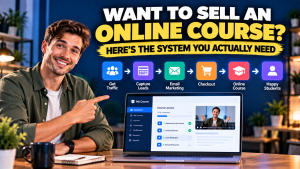 Want to Sell an Online Course? Here’s the System You Actually Need
 Systeme.io vs WooCommerce: Which Is Simpler for Selling One Digital Product?
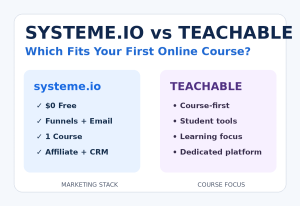 Systeme.io vs Teachable: Which Is Better for Selling Your First Online Course?
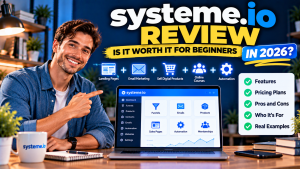 Systeme.io Review: Is It Worth It for Beginners in 2026?