How to Build an Email List From Scratch: A Beginner’s Step-by-Step Guide
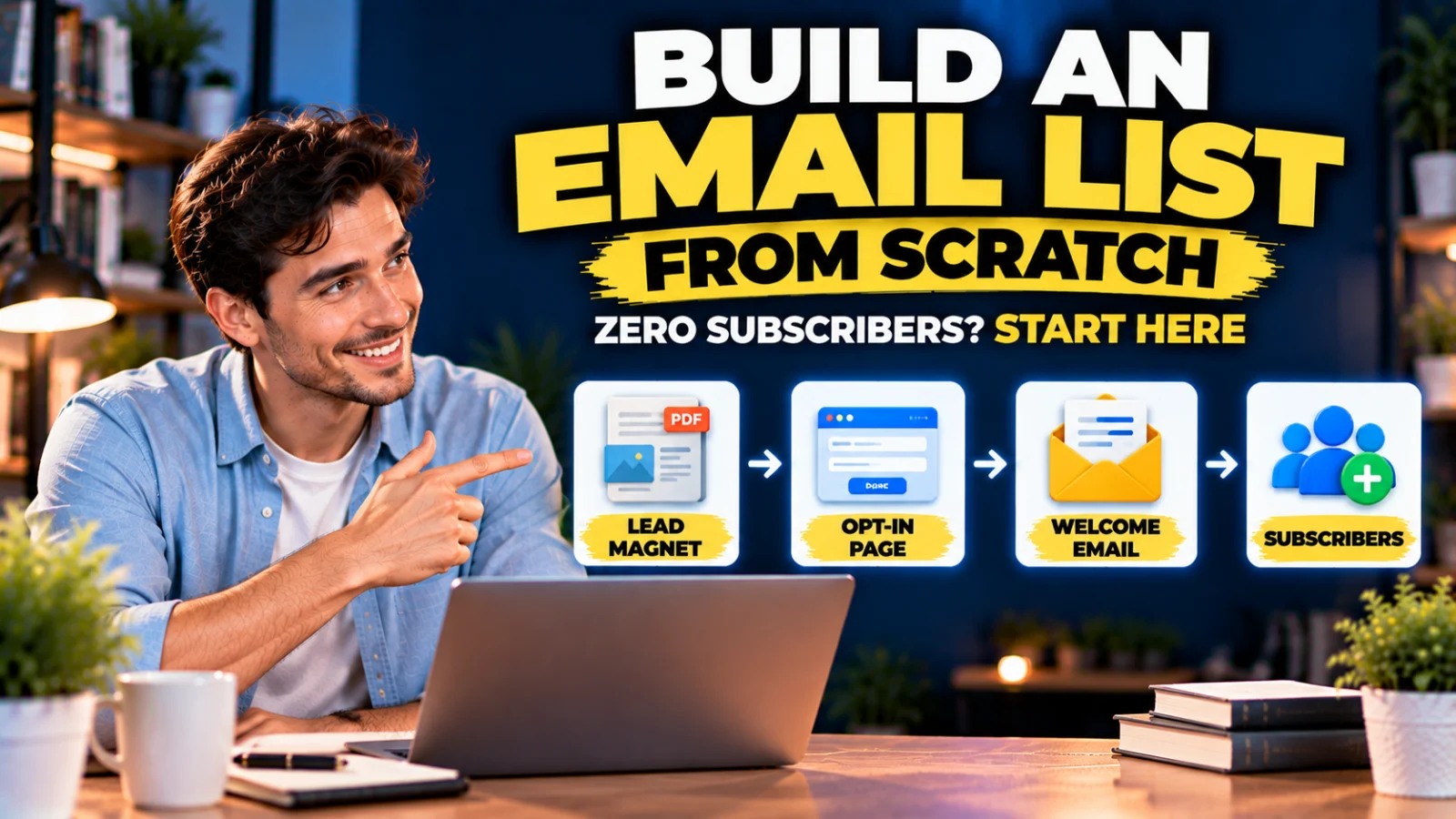
You do not need thousands of followers to start an email list. You need the right person, a useful reason to subscribe, a place to enter an email address, and a reliable way to follow up.
Beginners often start in the wrong order: choose software, add a generic “Subscribe for updates” form, then wait. A better approach is to build the list around a specific audience and problem.
How to Build an Email List From Scratch: Start With One Audience
Before creating a form, decide who the list is for. “People interested in business” is broad. “People starting a small online business” is better. “Freelancers who struggle to follow up with unpaid invoices” is more specific.
A narrower audience gives you clues about the resource to offer, articles to write, emails to send and products that may eventually be relevant.
How to Build an Email List From Scratch Without an Existing Audience
Starting at zero means you cannot rely on a large social following. Instead, create a reason for a small number of relevant people to subscribe.
Specific Audience + Specific Problem + Useful Free Resource = Reason to Subscribe
Example: freelancers + late client payments + “5 Payment Follow-Up Email Templates.”
Step 1: Decide What Your Email List Is About
Subscribers join with an expectation. Write one sentence: “I help [audience] achieve [outcome] by sending [type of useful content].”
For example: “I help people starting an online business choose practical tools, build simple marketing systems and avoid unnecessary software costs.”
Step 2: Find a Problem Worth Exchanging an Email Address For
Look for a problem that is specific, common among your intended audience, small enough to help with quickly and connected to topics you plan to email about later.
Research Google and YouTube suggestions, Reddit and community discussions, comments, customer questions, reviews and recurring questions. Do not create a 70-page ebook merely because ebooks sound valuable. A one-page checklist that solves an immediate problem can be more attractive.
Step 3: Create a Lead Magnet That Attracts the Right Subscriber
Useful formats include checklists, templates, worksheets, short guides, calculators, spreadsheets, email-script packs, mini courses and resource lists. The format matters less than the problem it solves.
Compare “Small Business Guide” with “12-Point Checklist Before You Launch Your First Digital Product.” Specific offers communicate the outcome before the visitor subscribes.
Do Not Build a Lead Magnet That Attracts the Wrong People
An unrelated giveaway may produce more addresses but lower-quality subscribers. A smaller list of people who requested an online-business checklist can be more useful than a huge list attracted by an unrelated prize.
Step 4: Create the Simplest Useful Version
Your first lead magnet does not need to become a publishing project. If the promise is a Digital Product Launch Checklist, include useful checks for offer validation, pricing, sales page, checkout, delivery, confirmation email, mobile experience and launch promotion.
Can You Use AI to Create a Lead Magnet?
Yes, as an assistant. Use: Your research → AI outline → AI-assisted draft → Your verification → Your examples → Final edit. Verify facts and remove generic filler.
Step 5: Choose an Email Marketing System
Only now choose software. At minimum it should capture and store opted-in subscribers, deliver the promised resource, send future email and allow unsubscribing.
Do You Need Separate Form, Landing Page and Email Tools?
No. Separate specialist tools can work well, but an integrated platform can reduce connections. Systeme.io is one option; its current Free plan includes up to 2,000 contacts, 3 funnels and unlimited email sends, although campaigns, tags and automation are limited.
If you want to test the integrated approach, create a Free Systeme.io account here.
Affiliate disclosure: The Systeme.io link above is an affiliate link. If you later upgrade to a paid plan, I may earn a commission at no additional cost to you.
Step 6: Create a Focused Opt-In Page
The page has one job: convince the right visitor the resource is worth the email exchange. Use a clear headline, short explanation, benefit bullets, optional visual, email field, clear CTA and appropriate consent/privacy information.
Step 7: Ask for Only the Information You Need
If all you need is an email address, start there. Ask for additional fields only when you have a reason to use them.
Step 8: Use Permission-Based Signup
Do not buy or scrape lists, and do not silently add everyone who once contacted your business. Google’s current sender guidance recommends making sure recipients opt in and confirming addresses before subscribing them.
Should You Use Double Opt-In?
Double opt-in verifies the address and intent. Google’s current email subscription guidance recommends confirmed addresses/double consent. Legal requirements vary by location, so treat this as deliverability guidance rather than personalized legal advice.
Step 9: Deliver the Lead Magnet Immediately
Automate delivery through a thank-you page, welcome email or both. Email delivery also teaches the subscriber which sender name and address to recognize.
Step 10: Write the First Welcome Email Before Promotion
Confirm why the subscriber is receiving it, deliver the resource, introduce what you help with, set expectations and provide an easy unsubscribe option. You do not need a 12-email sequence on day one.
Step 11: Decide What You Will Send Next
Choose a sustainable pattern: practical tutorials, checklists, tool comparisons, mistakes to avoid, examples, new resources and occasional relevant offers. Continue the promise that earned the subscription.
Step 12: Get Your First Subscribers Without Paid Ads
Add the lead magnet to relevant blog articles, YouTube descriptions and videos, and social profiles. Participate in communities by helping first rather than spamming links. Invite existing professional contacts to opt in rather than silently importing them.
Step 13: Turn Search Traffic Into Subscribers
Without an opt-in: Google → Article → Visitor Leaves. With a relevant resource: Google → Article → Resource → Subscriber → Future Emails.
Step 14: Use Several Entry Points Without Creating Too Many Lists
You can maintain one main online-business audience while offering several relevant resources: a Digital Product Launch Checklist, Lead Magnet Planning Worksheet, Sales Funnel Checklist or Software Cost Audit. Tags or segments can preserve what each subscriber originally wanted.
Step 15: Track Where Subscribers Come From
Track the article, lead magnet and traffic source that generated each signup where practical. Fifty subscribers is useful data; knowing that 35 came from one article is much more actionable.
Do Not Judge the List Only by Subscriber Count
Watch confirmed subscriptions, clicks, replies, unsubscribes, spam complaints and eventual conversions. Open-rate data can be imperfect, so do not treat one metric as absolute truth.
Step 16: Authenticate Your Sending Domain
Google currently requires senders to personal Gmail accounts to authenticate with SPF or DKIM and recommends SPF, DKIM and DMARC. Senders above 5,000 messages per day to Gmail accounts face additional bulk-sender requirements including SPF, DKIM, DMARC and alignment.
Step 17: Make Unsubscribing Easy
An unsubscribe is better than a spam complaint. Google requires one-click unsubscribe for applicable marketing/subscription messages above its bulk-sender threshold.
Step 18: Keep Spam Complaints Low
Google recommends keeping user-reported spam below 0.1% and avoiding 0.3% or higher. The simplest strategy is to send wanted email: permission-based, relevant, expected and easy to leave.
Step 19: Clean the List as It Grows
Some subscribers become inactive. Review them periodically using your provider’s tools and policies. A healthy list is not simply the largest possible database.
What Should Your First Lead Magnet Be?
For an online-business audience, candidates include a 27-Point Digital Product Launch Checklist, First Sales Funnel Planning Worksheet, Lead Magnet Idea Worksheet, Software Cost Audit or Simple Online Business Tool Stack Checklist.
What If Nobody Downloads It?
No traffic suggests a distribution problem. Traffic without signups suggests an offer/page/audience-match problem. Signups without engagement may indicate the wrong incentive or mismatched follow-up. Spam placement requires reviewing authentication, permission, content and sender reputation.
Should You Pay for Ads?
You can, but organic traffic lets a beginner validate the audience, lead magnet, page and welcome sequence first. Paid acquisition makes more sense after you understand whether the system works.
Should You Buy an Email List?
No. A purchased address is not a subscriber who requested your content, and purchased lists can create permission, deliverability and reputation problems.
How Long Does It Take?
There is no reliable universal timeline. A better first goal than “1,000 subscribers in 30 days” is to build a repeatable system that turns relevant visitors into willing subscribers.
A Simple First-Week Email List Plan
Day 1: audience/problem. Day 2: outline lead magnet. Day 3: create it. Day 4: opt-in page. Day 5: welcome email. Day 6: test the full flow. Day 7: place it in one relevant traffic channel.
The System You Are Actually Building
Relevant Content → Lead Magnet → Opt-In → Welcome Email → Useful Follow-Up → Relationship → Relevant Offer
Where Systeme.io Can Fit Later
If you prefer landing pages, contacts, email and funnels in one platform, Systeme.io can cover that workflow. Its Free plan has meaningful limits, so it is not automatically right for every business.
If that integrated setup matches your plan, test Systeme.io Free here.
Final Takeaway
Building an email list from scratch is primarily a value-and-distribution problem. Start with one audience, one specific problem, one useful resource, one focused opt-in page and useful follow-up. Do not obsess over 10,000 subscribers before you have 10 people who genuinely want the next email.
A small relevant list is the foundation. Traffic and scale come after the system works.
Suggested Articles to Read
 Systeme.io Pricing: Which Plan Do You Actually Need in 2026?
 Email Marketing Checklist Before You Send Your First Campaign
 ClickFunnels Alternative With Email Marketing Built In
 Best Free Email Marketing Tools for Beginners: What Do You Really Get for $0?
 Want to Sell an Online Course Without Building a Website?