How to Create a Landing Page Without a Website for Free
You do not need a traditional multi-page website to promote an offer, collect email subscribers or validate a new idea. A standalone landing page can give visitors everything they need to understand one offer and take one clear action.
This guide shows you how to create and publish a landing page for free with systeme.io. The platform provides a visual page builder and a hosted page URL, so you can start without separate hosting, coding or a custom domain.
What Is a Standalone Landing Page?
A landing page is a focused web page created for a specific campaign. Unlike a normal website, it does not need several pages, a large navigation menu or a complete company history. Its purpose is to guide the visitor toward one meaningful action.
That action could be:
- Joining an email list or waitlist
- Downloading a free guide
- Booking a consultation
- Registering for an event
- Buying a digital product
- Clicking through to an affiliate offer
Because the page is hosted by the landing-page platform, it can work independently from a conventional website.
What You Need Before Building
Prepare the message before opening the page editor. This prevents the design process from becoming a collection of attractive sections that do not support the same goal.
- A clearly defined target audience
- One offer or campaign goal
- A benefit-focused headline
- Three to five important benefits
- A call to action
- Any genuine testimonials or proof you can use
Step 1: Create a Custom Funnel
Sign in to systeme.io, open Sites and select Sales funnels. Click Create, enter a descriptive name and choose the available systeme.io domain.
Select Custom as the funnel type. This creates a flexible starting point without forcing you into a complete sales or email funnel. You can then click Add step and create the single page you need.

Step 2: Choose the Right Page Type
Choose an opt-in page when the primary goal is to collect contact details. Choose a sales page when visitors need to read about an offer and continue to a checkout, calendar or another destination.
Select a clean template with a structure close to the one you need. Replacing text and colors is usually faster than restructuring a complicated template. You can also start from a blank page if you prefer complete control.
Step 3: Build a Clear Hero Section
The first screen should quickly explain the offer. Add a headline that promises a specific and believable result, followed by one or two sentences that provide context.
Include one visually prominent call-to-action button or form. Avoid placing several unrelated actions in the hero. When every button asks the visitor to do something different, the page loses focus.
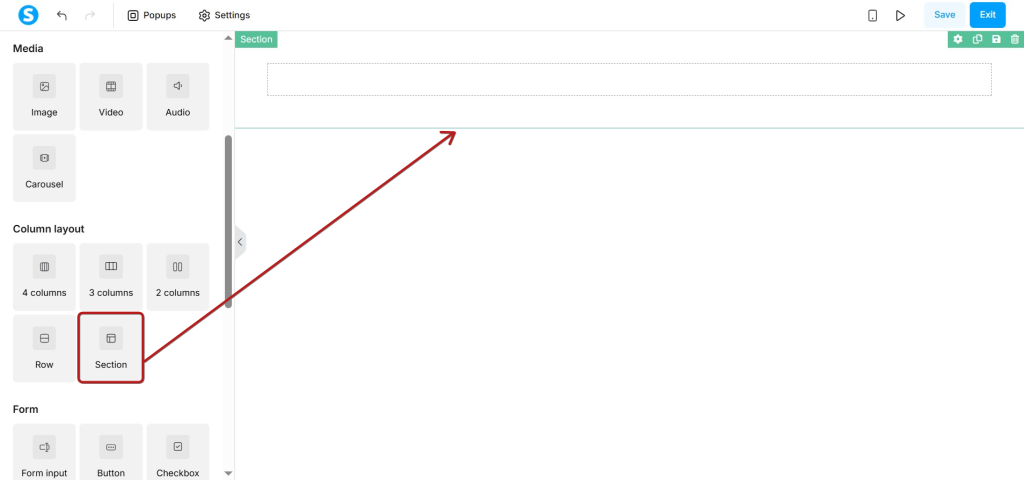
Step 4: Add the Essential Sections
A beginner-friendly landing page can use this simple structure:
- Hero: State the main result and present the primary action.
- Benefits: Explain how the offer improves the visitor’s situation.
- How it works: Reduce uncertainty with three short steps.
- Proof: Add genuine testimonials, results or relevant credentials.
- Final CTA: Repeat the same action at the end of the page.
Keep paragraphs short and use descriptive subheadings. Visitors often scan a landing page before deciding whether to read it in detail.
Step 5: Configure the Button or Form
For a click-through page, select the button and connect it to the correct checkout, booking page or external destination. Use button text that describes the next step, such as Get the Free Guide or Book Your Call.
For a lead-capture page, add an email field and set the button action to Submit form. Configure a thank-you page, success message or custom redirection so visitors know the submission worked.
Step 6: Set the URL and Page Title
Back in the funnel, replace the automatically generated URL path with something short and readable. Systeme.io’s official documentation notes that URL paths should use lowercase characters.
You can publish the page on the included systeme.io subdomain. A custom domain can improve branding later, but it is not required to test the page or begin sharing it.
Inside the editor settings, add a clear browser title and a concise search description. If the page will be shared on social media, upload an appropriate preview image.

Step 7: Check the Mobile Layout
Use the device preview controls to inspect the page on a smaller screen. Pay particular attention to the headline, image dimensions, spacing, form fields and button size.
Do not assume a desktop layout will automatically feel comfortable on a phone. Large empty spaces, tiny text or an oversized image can hide the call to action below the first screen.
Step 8: Test Before Sharing
Save the page and open its public URL in a private browser window. Complete the exact action you expect a visitor to take.
- Confirm the page loads without requiring a login
- Test every button and form
- Check the thank-you page or destination
- Confirm automated emails arrive when applicable
- Review the page on a real mobile device
- Check spelling, image quality and link tracking
Final Thoughts
A standalone landing page is often enough to test an idea, collect leads or promote one offer. Start with a clear message and one action instead of waiting until you can build a complete website.
Systeme.io combines the visual editor, hosting, forms and automation in one account, which makes it a practical starting point for a beginner who wants to publish without assembling several separate services.
Ready to Publish Your Landing Page?
Build one focused page and share it without setting up a traditional website.