15 Lead Follow-Up Templates Small Businesses Can Actually Use
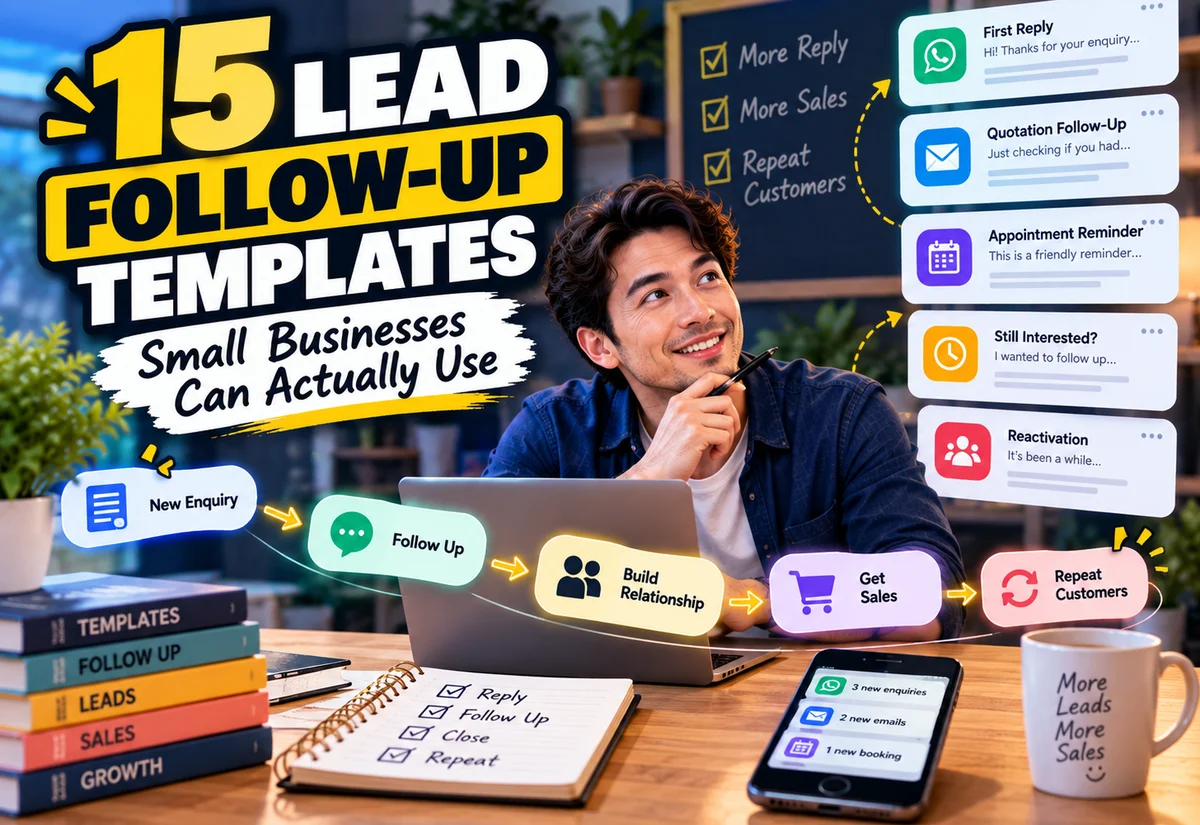
A surprising number of small-business leads do not need a complicated sales funnel. They need a clear reply, the right information, and a sensible follow-up when the conversation goes quiet.
The problem is that follow-up often happens from memory. An enquiry arrives through email, WhatsApp, a contact form, social media, or a marketplace. Someone replies once, gets busy, and the lead disappears into an old conversation.
That makes lead follow-up templates a practical digital-product opportunity. The useful product is not a folder of aggressive “closing scripts.” It is a small communication system that helps a business know what to send, when to send it, and when to stop.
Lead Follow-Up Templates Small Businesses Can Actually Use
A good follow-up library should cover different moments in the customer journey instead of repeating the same “just checking in” message fifteen times.
New Enquiry → Qualification → Quote / Offer → Follow-Up → Decision → Customer → Repeat Purchase
The templates below can be sold as editable documents, a spreadsheet-based follow-up system, a Notion-style workspace, a CRM companion, or a niche-specific communication kit.
Lead Follow-Up Templates Small Businesses Can Actually Use Without Sounding Robotic
The wording should be adaptable. A wedding photographer, renovation contractor, tutor, consultant, and local printing business will not speak to customers in exactly the same way.
Use placeholders for names, services, dates, quotations, and next steps. More importantly, explain the purpose of each message so buyers know when it is appropriate.
1. New Enquiry First-Reply Template
Use it when: A new prospect asks about a product or service.
The first reply should acknowledge the enquiry, answer what can be answered immediately, and make the next step obvious.
Quick execution: Create three versions: a short chat reply, a fuller email reply, and a version that requests missing project information. Add fields for customer name, requested service, expected response time, and next action.
Niche example: A photographer can request event date, location, type of event, and approximate coverage hours instead of sending a generic “How can I help?” response.
2. Missing Information Follow-Up
Use it when: The business cannot prepare a quote or recommendation because important information is missing.
This template should make the request easy to complete. Instead of “Please send more details,” list the exact information required.
Quick execution: Build niche-specific checklists that can be pasted into email or chat. A printing business might request size, quantity, material, finishing, artwork status, and required date.
3. Post-Discovery Call Follow-Up
Use it when: A consultation, discovery call, or sales conversation has just ended.
The follow-up can summarize the problem discussed, agreed scope, outstanding questions, and next step. This reduces misunderstandings while the conversation is still fresh.
Quick execution: Use a four-part structure: “What we discussed → What you need → What happens next → When to expect it.” Include a notes-to-message worksheet so the buyer can turn call notes into a concise follow-up.
4. Quotation Sent Template
Use it when: A quote, proposal, or estimate has just been delivered.
Do not send only an attachment. A useful message tells the prospect what was sent, what to review, how to ask questions, and what the next step is if they want to proceed.
Quick execution: Provide versions for formal email and conversational messaging. Include optional wording for quote validity only when the business actually uses a defined validity period.
5. Quotation Follow-Up Template
Use it when: The prospect received the quotation but has not responded after a reasonable period.
The goal is to reopen the conversation, not pressure the person.
Quick execution: Give buyers several intent-based versions: “Any questions?”, “Has the project timing changed?”, and “Would a different scope be more suitable?” The business can choose the version that fits the situation.
6. “Still Interested?” Follow-Up
Use it when: A lead showed interest but the conversation stopped before a quotation or purchase.
This template should make it easy for the prospect to answer honestly, including if the timing is no longer right.
Quick execution: Include a low-pressure response structure with simple options: continue now, revisit later, or close the enquiry. This can help the business keep its lead list cleaner without assuming silence means rejection.
7. Appointment Confirmation Template
Use it when: A consultation, viewing, service appointment, demo, or meeting has been booked.
Include date, time, location or meeting link, what the customer should prepare, and how to reschedule if necessary.
Quick execution: Create versions for in-person and online appointments. Add a configurable reminder schedule rather than hard-coding one timing for every business.
8. Appointment Reminder Template
Use it when: An upcoming appointment needs a reminder.
A reminder should be short. The digital product can add value by pairing message templates with a simple schedule and status tracker.
Quick execution: Include fields for appointment time, preparation, location, reschedule instructions, and contact method. Do not promise that reminders will eliminate no-shows.
9. Proposal Decision Follow-Up
Use it when: A more substantial proposal has been presented and the prospect may need time or internal approval.
This differs from a basic quotation follow-up because the buyer may have stakeholders, questions, or a decision process.
Quick execution: Add templates for checking decision status, offering clarification, confirming whether priorities changed, and scheduling a short review call.
10. Scope Alternative Follow-Up
Use it when: The original offer may not fit the prospect’s current budget, timing, or requirements.
Rather than automatically discounting, a business can offer a smaller scope, phased project, or different package when those alternatives genuinely exist.
Quick execution: Create a worksheet where the seller defines “Full Scope,” “Reduced Scope,” and “Later Add-On” before writing the message. This prevents random discounting from becoming the default follow-up tactic.
11. Lead Nurture Check-In Template
Use it when: The prospect is relevant but not ready to buy yet.
A useful check-in can provide information related to the original problem instead of repeatedly asking for a purchase.
Quick execution: Pair three message templates with a small content bank: FAQ, checklist, example, case study, comparison, or useful guide. Buyers can choose something genuinely relevant to the lead.
12. Old Lead Reactivation Template
Use it when: A previous enquiry went quiet and there is a legitimate reason to reconnect.
The message should acknowledge the time gap and provide context. It should not pretend the conversation happened yesterday.
Quick execution: Build versions around real triggers: service availability reopened, a relevant new package, seasonal planning, or a requested future follow-up date. Include an easy way for the person to decline further contact.
13. Post-Purchase Follow-Up Template
Use it when: The lead has become a customer.
Lead management should not end at payment. A post-purchase message can confirm what happens next, provide access or preparation instructions, and reduce uncertainty.
Quick execution: Map the first 24–48 hours after purchase. Create messages for confirmation, access/delivery, support, and the next milestone. Adapt the timing to the actual product or service.
14. Related-Product Cross-Sell Template
Use it when: An existing customer has bought something and another product is genuinely complementary.
Cross-selling works best when the connection is obvious. Someone buying a client onboarding template may also need a revision tracker or offboarding checklist; someone buying a quotation calculator may later need a job-costing spreadsheet.
Quick execution: Build a Product A → Related Product B map. Write the message around the next problem the customer may encounter, not merely “Buy this too.”
15. Past-Customer Re-Engagement Template
Use it when: A previous customer may reasonably need the service or product again.
This could be maintenance, replenishment, an annual update, a new version, a seasonal service, or another project.
Quick execution: Create a follow-up calendar based on the natural purchase cycle. Segment past customers by what they previously bought so the message can be relevant.
Do Not Sell Follow-Up Templates as “Magic Closing Scripts”
Follow-up can improve consistency, but a template cannot guarantee a sale. The offer may be wrong, the timing may be wrong, the customer may have chosen a competitor, or the project may simply no longer be needed.
A better product promise is organizational:
| Avoid | Better Positioning |
|---|---|
| “Close every lead” | Build a consistent follow-up process |
| “Guaranteed conversion scripts” | Ready-to-customize message templates |
| “Never lose a lead again” | Track leads and next actions more clearly |
| “Automate sales completely” | Automate suitable reminders and email sequences |
Turn the 15 Messages Into a Sellable Follow-Up System
A plain document containing messages is easy to copy. A stronger digital product combines communication templates with a lightweight process.
For example, package:
- 15 editable follow-up templates;
- a lead tracker;
- lead-stage dropdowns;
- last-contact and next-action fields;
- a follow-up calendar;
- channel suggestions;
- customization instructions;
- completed examples for one niche.
This turns the product from a “script pack” into a simple operating system for small-business follow-up.
A Simple Lead Tracker to Include
The tracker does not need to imitate a full CRM. A practical first version can use these columns:
| Field | Purpose |
|---|---|
| Name / Company | Identify the lead |
| Interested In | Product or service requested |
| Source | Website, referral, marketplace, social, etc. |
| Stage | New, Qualified, Quoted, Follow-Up, Won, Lost |
| Last Contact | When communication last happened |
| Next Action | What should happen next |
| Follow-Up Date | When to revisit the lead |
| Notes | Relevant context |
If the product becomes popular, a more advanced version could later add dashboards, reminders, or CRM integrations. Validate demand before building those extras.
Manual Follow-Up vs Email Automation
Not every follow-up should be automated.
A custom quotation question may deserve a personal reply. A standard download welcome sequence or educational follow-up may be suitable for automation. The best system often uses both.
| Better Manually | Potentially Automatable |
|---|---|
| Complex quotation questions | Welcome sequence |
| Negotiation or scope changes | Requested educational series |
| Sensitive complaints | Product usage tips |
| High-value proposal discussion | Relevant customer follow-up |
Build an Email List You Actually Own
Marketplaces and social platforms can help with discovery, but an opted-in email list gives a business a direct communication channel that is less dependent on a feed or marketplace search result.
That does not mean copying every email address you encounter into a newsletter list.
Collect subscribers through your own website, lead magnet, checkout, or other appropriate opt-in process, explain what they are signing up for, and follow applicable privacy and marketing rules.
For marketplace customers, follow the marketplace’s communication and privacy rules. For example, Etsy’s current guidance says sellers using buyer information outside Etsy must follow applicable rules and be transparent about uses such as marketing; Etsy’s shop-policy guidance also specifically notes consent requirements for marketing use. Do not treat a marketplace transaction as automatic permission for unrelated email blasts.
Segment Customers Before You Send a Blast
Once people have legitimately joined your list, avoid sending every promotion to every contact.
Useful segments might include:
- leads interested in a specific service;
- buyers of a particular digital product;
- customers who purchased a starter product but not the related bundle;
- past service clients;
- subscribers who requested a particular lead magnet.
Segmentation makes future broadcasts and campaigns more relevant.
Opt-In → Tag / Segment → Helpful Follow-Up → First Purchase → Related Offer → Repeat Customer
Use Cross-Selling to Solve the Next Problem
Cross-selling should follow the customer’s workflow.
If someone buys a Lead Follow-Up Template Pack, a logical next product could be a lightweight CRM spreadsheet. If they buy a Client Onboarding Kit, the next relevant product could be a revision-and-approval system. If they buy a Website Content Planner, a content calendar may make sense later.
This approach is more coherent than building dozens of unrelated digital products and emailing all of them to the same list.
Marketplace Traffic and Your Own Website Can Work Together
A marketplace can expose products to shoppers already searching there, while your own website can build search traffic, educational content, direct sales, and an opted-in audience.
Use each channel for what it is good at. Do not move an in-progress marketplace transaction off-platform when the marketplace prohibits that behavior, and do not assume marketplace buyer data can automatically become your marketing list.
For direct customers and legitimate subscribers on your own site, you have more room to build a structured customer journey around useful content, products, and follow-up.
Use Systeme.io to Organize Direct Follow-Up and Cross-Selling
If you want a simpler setup for your own direct-selling channel, Systeme.io is one option worth exploring. You can use a funnel or landing page to collect leads, organize contacts, send email campaigns, and build automation around your own customer journey.
A practical digital-product flow could look like this:
Article → Lead Magnet / Product Page → Opt-In or Purchase → Tagged Contact → Follow-Up Emails → Related Product → Cross-Sell
The important part is not automation for its own sake. Keep the list permission-based, segment contacts by relevant interests or purchases, and send offers that logically connect to what the person originally wanted.
Start with a simple sequence before building complex automation. Platform features and plan limits can change, so check the current Systeme.io plan details when implementing the workflow.
How to Package This as a Digital Product
A strong version of this product could include three layers:
Layer 1 — Message Library: the 15 templates in editable form.
Layer 2 — Follow-Up Tracker: spreadsheet or database for lead stage, last contact, next action, and follow-up date.
Layer 3 — Implementation Guide: examples showing how a specific type of small business customizes the messages and decides what to send next.
Then create niche editions instead of merely changing the cover:
- Lead Follow-Up Kit for Wedding Photographers;
- Quotation Follow-Up System for Contractors;
- Enquiry Follow-Up Templates for Tutors;
- Lead Follow-Up Pack for Freelance Designers;
- Customer Follow-Up System for Local Printing Businesses.
Validate the Niche Before Creating Five Versions
Do not build five niche editions on day one.
Choose one buyer type, speak to people in that market, review the questions they repeatedly receive, and test the workflow. The most valuable differences between niches may be the information requested, buying cycle, communication channel, quotation process, and typical next step.
Once one edition is useful, you can adapt the underlying framework to another niche without starting from zero.
The product is not really “15 messages.” The product is a clearer system for knowing which lead needs attention, what to say next, and how that relationship can continue after the first purchase.
Final Takeaway
Lead follow-up templates are a good digital-product category because the underlying problem is easy to understand: small businesses receive enquiries, send quotes, schedule appointments, wait for decisions, and reconnect with customers.
Build the product around that workflow rather than promising magical sales scripts.
Start with useful messages, add a simple tracker, niche the examples, and show buyers how to customize the system. Then, for your own direct-selling business, build an opted-in customer list, segment it properly, use email campaigns responsibly, and cross-sell products that solve the customer’s next related problem.
Suggested Articles to Read
 Want to Sell an Online Course Without Building a Website?
 Want to Sell an Online Course? Here’s the System You Actually Need
 Systeme.io vs WooCommerce: Which Is Simpler for Selling One Digital Product?
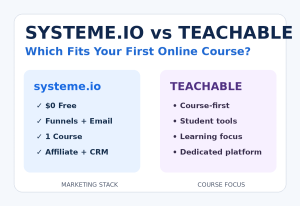 Systeme.io vs Teachable: Which Is Better for Selling Your First Online Course?
 Systeme.io Review: Is It Worth It for Beginners in 2026?