One Platform vs 5 Separate Tools: What Do You Actually Need to Sell Online?
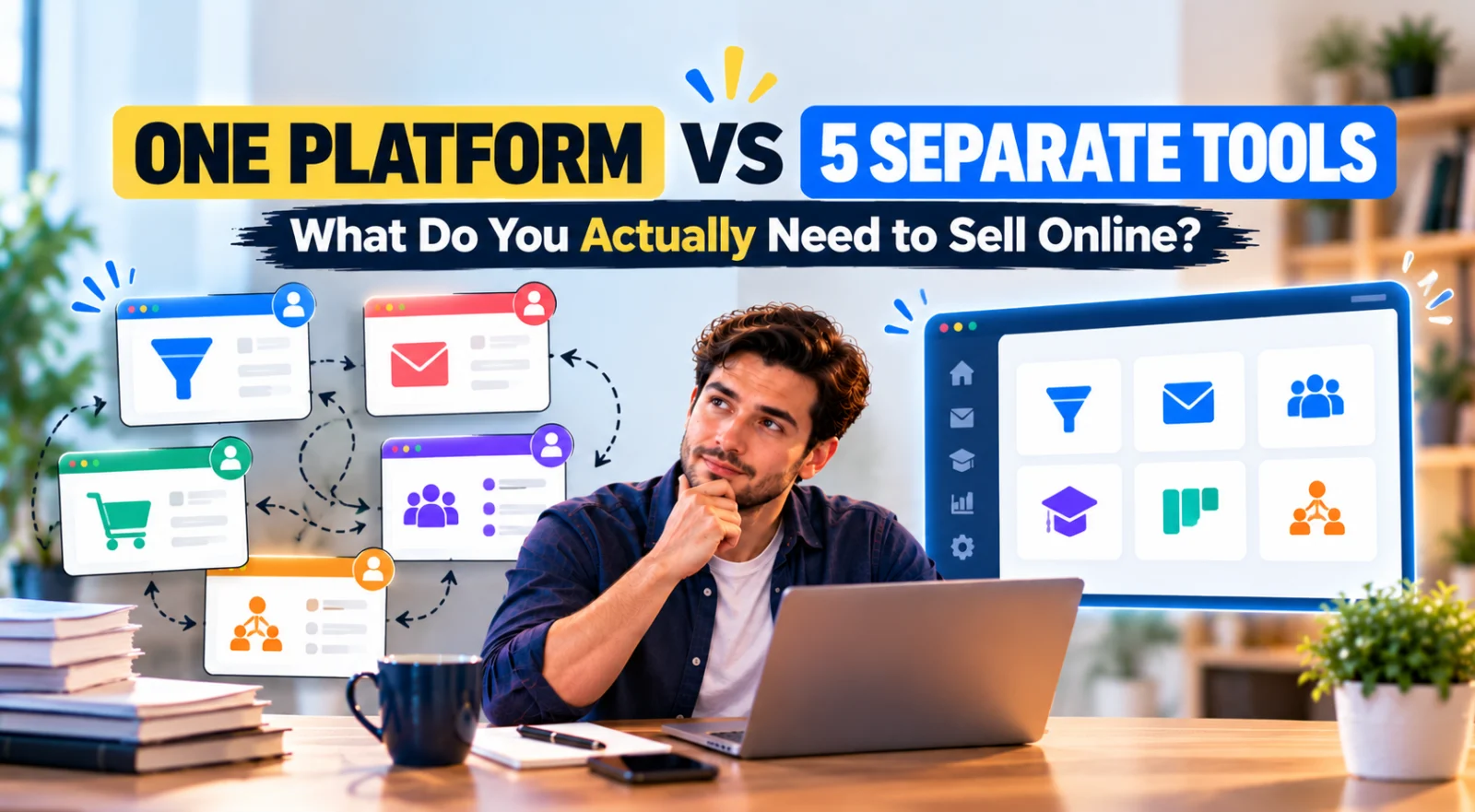
Selling online can sound simple at first.
You need a page that explains the offer and a way for someone to pay.
Then you start building.
You need somewhere to collect email addresses. You want an automatic welcome sequence. Your sales page needs a checkout. Customers need to receive what they purchased. You want to know which leads are still considering the offer. Later, you may want affiliates to promote it.
Suddenly, “I need a website” turns into a small software stack.
The important question is not whether one platform or five separate tools is universally better. It is whether the extra specialization of separate tools is actually useful for the business you are building.
One Platform vs 5 Separate Tools: What Do You Actually Need to Sell Online?
For a simple online business, five functional areas appear repeatedly:
- Landing pages and sales funnels — to turn visitors into leads or customers.
- Email marketing — to follow up with people who are not ready to buy immediately.
- Checkout and payment — to actually complete the sale.
- Lead or customer tracking — to understand where prospects are in the process.
- Affiliate management — if you want partners to promote your offer for commission.
You can buy a separate specialist for every job.
Or you can use an integrated platform that puts several of those functions in one account.
One Platform vs 5 Separate Tools for a Beginner Online Business
| Business Need | Separate-Tool Approach | One-Platform Approach |
|---|---|---|
| Capture leads | Landing-page or form software | Built-in funnel/page builder |
| Follow up | Email marketing platform | Built-in email marketing |
| Sell | Checkout/ecommerce tool | Built-in order form and payment flow |
| Track opportunities | CRM | Built-in CRM pipeline |
| Recruit promoters | Affiliate software | Built-in affiliate management |
The feature list looks straightforward. The real difference appears in how those pieces communicate with one another.
Tool 1: You Need Somewhere to Turn Visitors Into Leads or Buyers
A homepage alone does not necessarily create a sales process.
Suppose you sell a digital template bundle. A visitor may need to move through:
Traffic → Sales Page → Order Form → Payment → Thank You / Delivery
If you build an email list first, the journey may be:
Traffic → Opt-In Page → Thank You → Email Follow-Up → Sales Page → Checkout
That is why funnel and landing-page software is often the first additional tool a beginner discovers.
You need pages designed around a specific action rather than a general website containing many possible destinations.
Tool 2: You Need Email Marketing Because Most Visitors Will Not Buy Immediately
A visitor downloads your checklist today. They may not be ready to buy until next week.
Without a follow-up system, the relationship can end when they leave the page.
Email marketing lets you:
- deliver a lead magnet;
- send a welcome sequence;
- educate the subscriber;
- answer common objections;
- announce offers;
- follow up after specific actions.
If your funnel builder does not include email, you now need a second system.
Landing Page Tool → Email Marketing Tool
That connection may be native, built through an integration, or handled by another automation service.
Tool 3: You Need a Checkout, Not Just a Buy Button
A sales page creates interest. A checkout completes the transaction.
The checkout may need to know:
- what the customer is buying;
- the price;
- the payment method;
- whether a coupon applies;
- what happens after payment;
- what access or product should be delivered.
For some businesses, a simple payment link is enough.
For others, the checkout is part of the funnel and may include an order bump or a post-purchase upsell.
Sales Page → Order Form → Order Bump → Payment → Upsell → Thank You
If your page builder and email tool do not handle that journey, a third tool enters the stack.
Tool 4: You May Need a CRM When a Lead Requires a Conversation
Not every online sale happens immediately.
Service businesses, consultants, agencies and higher-ticket offers often involve enquiries, calls, proposals and negotiation.
The workflow looks more like:
New Lead → Contacted → Qualified → Proposal Sent → Negotiation → Won / Lost
An email contact list does not automatically give you a visual view of that sales process.
This is where a CRM pipeline becomes useful.
If your existing tools do not provide one, you may add a fourth system.
Tool 5: You Need Affiliate Software If Other People Will Promote Your Offer
Affiliate marketing introduces another set of requirements.
You need to know:
- who referred the visitor;
- which affiliate generated the sale;
- how much commission is owed;
- which tracking link belongs to each affiliate;
- what affiliates can see in their dashboard.
This is not a normal email-marketing function or a standard payment button.
If your platform does not manage affiliates, a dedicated affiliate tool may become the fifth component.
Now You Have Five Tools — But You Also Have Connections Between Them
This is the part that is easy to overlook when comparing feature lists.
Five subscriptions are not just five subscriptions.
They can also mean:
- five accounts and dashboards;
- multiple billing relationships;
- different user interfaces;
- separate contact records;
- integration settings;
- data mapping;
- API keys or connectors;
- more places to investigate when something stops working.
Imagine this workflow:
Landing Page → Email Platform → Checkout → CRM → Affiliate System
Each arrow matters.
When a person submits the form, does the email platform receive them?
When they buy, does the email system know they are now a customer?
Should the CRM opportunity move to Won?
If an affiliate referred the customer, is that attribution preserved through checkout?
The complexity is not simply the number of tools. It is the number of relationships between the tools.
What Changes When the Functions Live in One Platform?
An integrated platform approaches the workflow differently.
Landing Page → Contact → Email → Checkout → Customer
The same environment may also handle:
Lead → CRM Pipeline → Sale
and:
Affiliate → Funnel → Checkout → Commission
The potential benefit is not that integration problems become impossible. Software can still have limitations and configuration mistakes can still happen.
The benefit is that fewer handoffs are required between unrelated systems.
One Platform Can Reduce Data Duplication
With separate tools, the same person may exist in several places.
For example:
| System | What It Knows |
|---|---|
| Landing-page tool | The visitor submitted a form |
| Email platform | The person is a subscriber |
| Checkout | The person purchased Product A |
| CRM | The opportunity was won |
| Affiliate software | Affiliate 27 referred the sale |
That can work perfectly when integrations are designed well.
But it also means the business depends on those systems keeping the relevant data synchronized.
In an integrated platform, more of that context can exist around the same contact and transaction ecosystem.
One Platform Can Simplify Automation
Consider a digital-product purchase.
You may want payment to trigger several things:
Payment Successful → Tag Customer → Send Confirmation → Grant Access → Stop Sales Emails → Record Affiliate Commission
With specialist tools, you may need cross-platform automation to coordinate those actions.
When the tools are part of the same platform, more of those triggers and actions can be configured internally.
This does not mean every possible automation will exist. It means the common workflow can require fewer external connections.
But Separate Tools Have a Major Advantage: Specialization
There is a reason successful companies use dedicated software.
A specialist CRM can offer sales forecasting, complex permissions, custom objects, advanced reporting and deep integrations.
A specialist ecommerce platform can provide sophisticated inventory, shipping, tax and product-management features.
A specialist email platform may provide advanced segmentation, deliverability controls, testing and reporting that matter to larger email operations.
So the decision is not:
“Why would anyone use separate tools?”
The better question is:
“Do I need that specialization yet?”
When Five Separate Tools Make Sense
A separate-tool stack becomes more reasonable when:
- your business already has established systems;
- you need a specialist feature the all-in-one platform cannot provide;
- your team has dedicated people managing different systems;
- you require advanced enterprise CRM capabilities;
- you operate a large ecommerce catalog with complex inventory;
- you need highly specialized analytics or integrations;
- switching an existing system would create more risk than benefit.
In those situations, integration complexity may be an acceptable price for deeper capability.
When One Platform Makes More Sense
The integrated approach becomes attractive when:
- you are launching your first offer;
- you are a solo operator or small team;
- you sell digital products, courses, coaching or simple services;
- your sales process is straightforward;
- you want to validate an idea before buying multiple subscriptions;
- you prefer fewer dashboards and integrations;
- you want email, funnels and checkout to share the same workflow.
This is particularly relevant for beginners because their biggest problem is often not missing advanced functionality.
It is getting the first complete system working.
What Do You Actually Need for a Simple Digital Product?
Strip the software names away.
If you want to sell an ebook, template, spreadsheet, calculator or small digital bundle, the minimum practical journey may be:
Visitor → Sales Page → Checkout → Payment → Product Delivery
If you want to build an audience first:
Visitor → Opt-In → Email Follow-Up → Sales Page → Checkout → Delivery
You may not need a CRM pipeline if every purchase is self-service.
You may not need affiliate management on day one.
The goal is not to activate every feature. The goal is to have the functions required by your actual customer journey.
What Do You Need for a Service Business?
A service business may have a different minimum stack:
Landing Page → Enquiry Form → Contact → Follow-Up → CRM Pipeline → Proposal → Sale
Checkout may happen later. Affiliate management may not matter at all.
This is why copying someone else’s “essential software stack” can lead to unnecessary tools.
Start with the customer journey, then choose the software.
What Do You Need for an Online Course?
A course adds delivery to the selling workflow:
Lead → Email → Sales Funnel → Checkout → Course Access
Now a separate-tool setup might require:
- landing-page/funnel software;
- email marketing;
- checkout/payment;
- course hosting;
- possibly affiliate software.
This is one of the situations where an all-in-one platform can simplify the initial stack considerably.
Where Systeme.io Fits Into This Comparison
Systeme.io is an example of the one-platform approach.
Its current feature set combines sales funnels, email marketing, website tools, checkout functionality, CRM Pipelines, online courses, marketing automation and affiliate management in the same platform.
That means a beginner can build workflows such as:
Opt-In → Email Sequence → Sales Funnel → Order Form → Customer
or:
Enquiry → Contact → CRM Pipeline → Follow-Up → Sale
or:
Affiliate → Funnel → Order Form → Sale → Commission
without choosing a separate platform for every individual stage.
How Much Can You Test on Systeme.io Free?
As of September 2026, Systeme.io’s official pricing page lists the Free plan with:
- up to 2,000 contacts;
- unlimited email sends;
- 3 sales funnels;
- up to 15 funnel steps;
- 1 CRM pipeline;
- 1 course;
- 1 affiliate program;
- 1 custom domain;
- 1 automation rule and 1 workflow;
- 1 one-click upsell;
- 1 order bump;
- unlimited file storage;
- 0% Systeme.io platform transaction fees.
The Free plan does have meaningful limits. One automation rule, for example, can become restrictive once your business has several processes.
But it gives a beginner enough of the underlying system to test whether the integrated approach suits the business before assembling a larger software stack.
Example: Selling a $29 Template Bundle
Suppose you want to launch a simple template bundle.
Your first version might need:
Sales Page → Checkout → Payment → Delivery Email
Later you add a lead magnet:
Opt-In → Welcome Email → Follow-Up → Template Offer
Then the product starts selling and you want partners to promote it:
Affiliate → Funnel → Checkout → Commission
With separate tools, every expansion may introduce another product or integration.
With Systeme.io, these functions can live inside the same platform.
The value here is not that you are using every feature immediately. It is that you can add another part of the customer journey without automatically adding another vendor.
Example: A Consultant Collecting Leads
Now imagine you sell a service rather than a downloadable product.
Your customer journey might be:
Article → Consultation Page → Enquiry → CRM Pipeline → Call → Proposal → Client
The email system can acknowledge the enquiry. The CRM pipeline can track the sales opportunity. Notes can preserve context as the conversation progresses.
Again, the point is not that a lightweight all-in-one CRM replaces every specialist CRM.
It is that a solo consultant may not need an enterprise sales system merely to track a handful of active opportunities.
Example: A Course Creator
A course creator may eventually need almost every component:
Lead Magnet → Email Nurture → Course Funnel → Checkout → Course Access → Affiliate Promotion
This is where separate subscriptions can accumulate quickly because email marketing, course hosting, funnel building and affiliate tracking are distinct software categories.
An integrated platform reduces the number of products required to create the first working version of that system.
Do Not Compare Only the Monthly Price
Price matters, but a useful comparison should include more than subscription totals.
| Question | Why It Matters |
|---|---|
| How many subscriptions? | Determines direct recurring cost. |
| How many integrations? | Determines setup and maintenance work. |
| Where is customer data stored? | Affects visibility and synchronization. |
| Can purchase events trigger email actions? | Affects automation simplicity. |
| Can leads move into a sales pipeline? | Matters for service or consultative sales. |
| Can affiliates be tracked? | Matters when partner promotion begins. |
| What happens when the business grows? | Determines whether the stack can expand with you. |
A cheap individual tool can still create an expensive stack if four more products are required around it.
Conversely, paying for several specialist tools can be completely reasonable if they produce capabilities your business actually uses.
A Better Way to Choose Your Software Stack
Instead of beginning with software brands, draw the customer journey.
Step 1: Start With the First Visitor
Where do they arrive?
A blog article? Landing page? Social link? Advertisement?
Step 2: Decide What Action You Want
Should they subscribe, request a quote, book a call or buy immediately?
Step 3: Map What Happens Next
If they subscribe, what email follows?
If they buy, how is the product delivered?
If they request a quote, where is the sales opportunity tracked?
Step 4: Add Only the Functions Required
Now you know whether you actually need email, CRM, course hosting, affiliate management or advanced checkout features.
Step 5: Decide Whether Integration or Specialization Matters More
If the workflow is simple, an all-in-one platform may remove unnecessary setup.
If one part of the business has sophisticated requirements, a specialist tool may justify the additional integration.
The Simplest Stack That Completes the Customer Journey Usually Wins
Beginners often collect software before they have customers.
They buy a funnel builder because someone recommended it, an email platform because every business needs a list, a CRM because it sounds professional, and an automation connector because the first three systems need to talk.
That reverses the process.
Build the workflow first.
Then choose the smallest set of tools capable of completing it reliably.
Final Takeaway
One platform is not automatically better than five separate tools.
Separate specialist tools are valuable when your business genuinely needs deeper functionality in each category.
But a beginner selling a straightforward digital product, course, coaching offer or service often needs integration more urgently than specialization.
You need a visitor to become a lead, a lead to receive follow-up, a buyer to complete payment, and the system to know what should happen next.
Systeme.io is one of the strongest starting options I would consider for that type of workflow because funnels, email marketing, checkout tools, CRM Pipelines, courses, automation and affiliate management can operate inside the same platform. Its current Free plan also lets a beginner test much of that model before committing to multiple subscriptions.
The decision becomes much easier when you stop asking:
“Which five tools should I buy?”
and start asking:
“What is the simplest system that can take my customer from first visit to completed sale?”
Suggested Articles to Read
 Want to Sell an Online Course Without Building a Website?
 Want to Sell an Online Course? Here’s the System You Actually Need
 Systeme.io vs WooCommerce: Which Is Simpler for Selling One Digital Product?
 Systeme.io vs Teachable: Which Is Better for Selling Your First Online Course?
 Systeme.io Review: Is It Worth It for Beginners in 2026?